AI Customer Service Automation Guide for Transforming Support
AI customer service automation takes care of routine questions in seconds and flags tougher issues for your experts. That lets your team zero in on conversations that make a real difference, all while providing 24/7 coverage.
Understanding AI Customer Service Automation
Across industries, companies are plowing resources into AI-driven support to sharpen both speed and satisfaction. Forecasts say the market will climb to $47.82 billion by 2030, a clear sign of the appetite for intelligent helpdesks. For a deeper dive into the stats, see Fullview’s analysis.
In this guide, you’ll pick up everything you need: how to set up AI, its essential features, potential pitfalls, and a roadmap for folding it into your existing support workflow.
- Faster Responses: AI answers common queries instantly, slashing wait times.
- Agent Empowerment: Complex tickets get steered straight to your specialists.
- Data Insights: Dashboards reveal patterns so you can fine-tune your process.

Why Businesses Choose Automation
Over and over, support teams report freeing up hours that would otherwise vanish into repetitive tasks. For routine questions, machines can run circles around manual workflows.
Customer service leaders report a 37% boost in first-contact resolution when leveraging AI for routine issues.
At the same time, agents gain breathing room to tackle higher-value projects. As more teams embrace these tools, you’ll see a clear shift: bots handle the mundane, and people dive into creative problem solving.
Getting Started Quickly
Kick off with a pilot focused on your most common ticket types.
- Define Objectives: Pinpoint targets for response speed and self-service rates.
- Choose a Platform: Evaluate options-think Ticketdesk AI-to match your volume and integration needs.
- Measure Success: Track KPIs such as CSAT, average handle time, and the share of tickets closed by automation.
With this foundation in place, you’re ready to explore ticket automation, smart routing, AI-generated replies, and real-time analytics. Read on to see how these components fit together and set your support operations on a new trajectory.
Let’s dive in.
Understanding Core Components
Every robust AI customer service automation strategy rests on four interlocking building blocks.
Ticket automation feels like a savvy mailroom sorting incoming letters by urgency and topic. Intelligent routing works like GPS, steering each question to the most qualified agent. Generative reply engines draft the first-response while analytics dashboards act as mission control, tracking every metric.
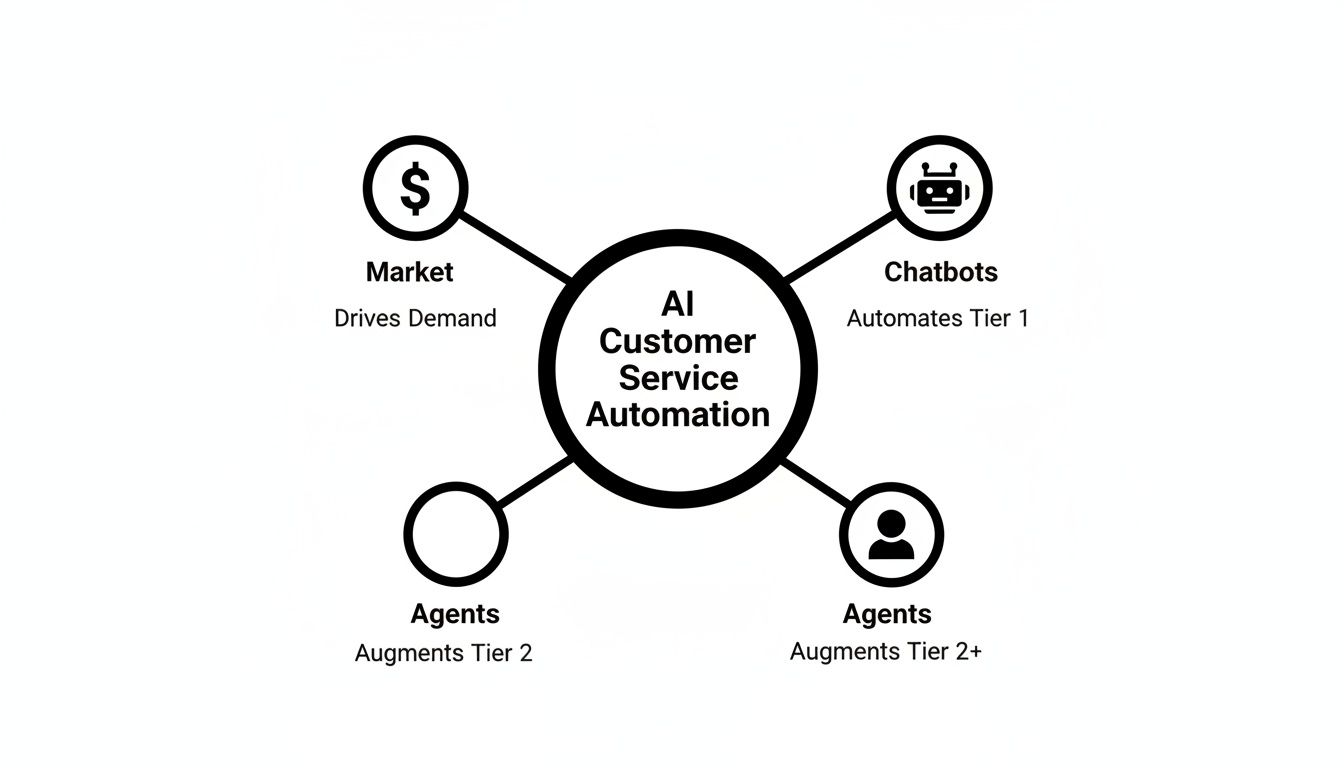
This concept map shows how market signals, chatbots, and live agents all branch from a central automation hub to deliver smooth, cohesive support.
Ticket Automation
Ticket automation leans on AI to read ticket content, extract intent, and sort items without human intervention. Under the hood, natural language processing meets rule-based engines, guiding requests through predefined paths.
Key Features:
- Automatic categorization by keywords and sentiment, so high-priority issues surface immediately
- Scheduled follow-ups and reminders, preventing tickets from getting lost
- Bulk actions that close repetitive queries in one sweep
This layer can slash backlog by 50%. Learn more about customization options in our API documentation at https://ticketdesk.ai/docs/api
Intelligent Routing
Think of intelligent routing as a talent scout. It profiles agents by skill, workload, and past successes. Machine learning models train on historical data, predicting which agent will resolve a similar issue fastest.
Steps in Routing:
- Inspect ticket metadata for context
- Rate agent expertise in relevant areas
- Assign the ticket to the top-rated agent
By sending invoice questions straight to finance experts, you can cut handover loops and trim average response times by over 40%.
Generative Reply System
Generative reply engines use large language models to draft customer messages. Agents then tweak these drafts, preserving brand voice and infusing empathy.
“Personalizing responses with AI assistance boosted our CSAT by 22%,” says one support leader.
Continuous feedback loops refine the suggestions. A simple tip: upload your best replies each month to keep the AI’s tone on point.
Analytics Dashboard
Analytics dashboards pull data from every automation module into one place. Teams track core metrics-ticket volume, first reply time, automation rate-on clear visual reports. Real-time alerts notify managers when key thresholds are breached, enabling swift corrective actions.
Focus Metrics:
- Automation Rate (tickets handled without human touch)
- First Reply Time (measures responsiveness)
- Customer Satisfaction (CSAT)
- Resolution Rate
Comparison Of Core Automation Components
This table offers a concise overview of each component’s main roles and the benefits they deliver.
| Component | Function | Benefit |
|---|---|---|
| Ticket Automation | Sorts, tags, and prioritizes incoming tickets | Cuts manual triage by 60% |
| Intelligent Routing | Matches tickets to best-fit agents | Reduces response times by 40% |
| Generative Replies | Generates contextual reply drafts | Boosts initial draft accuracy by 30% |
| Analytics Dashboards | Centralizes and visualizes performance data | Empowers data-driven improvements |
Together, these elements drive down manual workflows and accelerate resolutions across the support cycle.
Next, we’ll delve into the benefits and risks of deploying AI customer service automation.
Exploring Benefits And Risks
Automation in your customer service desk is like giving your team superpowers. They handle the busywork, so agents tackle thorny issues and innovate. Yet, there’s a flip side: if left unchecked, the system can create headaches of its own.
One firm shaved 30% off their support budget and cut resolution time by 50% thanks to predictive AI routing. Gorgias saw a 37% faster first reply, while ServiceNow’s bots answered 80% of tickets, drove down complex-case resolution by 52%, and unlocked $325 million in annual productivity savings. You can find more on these stats at Desk365.
- Major Cost Savings through reduced manual work
- Faster Resolutions as routine tasks are automated
- Scalable Support without a matching headcount increase
- Improved Satisfaction scores from quicker responses
Benefits In Practice
Teams often see their workload shift from mundane to meaningful. For instance, an e-commerce support group slashed average handle time by 40% after automating return requests. That drop in tedium boosts morale and delivers real performance gains.
- 24/7 Chatbots answer questions even off-hours
- Predictive Routing connects customers to the right expert instantly
- Data Dashboards uncover trends so you can act before issues escalate
Potential Pitfalls
Machine learning models need solid training to avoid misfires. A bot misinterpreting a request can frustrate, not fix, a problem. Glossing over brand tone makes your replies sound generic. And don’t forget compliance-sensitive records demand airtight controls.
- Inadequate Training Data leads to off-base answers
- Excessive Automation risks losing the personal touch
- Data Privacy concerns if information isn’t handled securely
- Escalation Gaps when human intervention lags
Balancing Efficiency And Empathy
The magic happens when speed and sincerity coexist. Always let agents vet AI suggestions and weave in empathy. Run regular audits to keep responses on brand and aligned with customer expectations.
- Mix AI drafts with personalized greetings for warmth
- Trigger human takeover when sentiment or complexity spikes
- Retrain your models quarterly using fresh support tickets
- Watch CSAT trends and tweak automation rules accordingly
Effective AI customer service automation moves quickly, but never at the expense of genuine human connection
| Benefit | Risk |
|---|---|
| Lower Costs | Miscommunication |
| Faster Replies | Loss Of Tone |
| Higher Satisfaction | Privacy Concerns |
| Scalability | Oversight Burden |
Risk Mitigation Strategies
Tackle potential issues before they balloon. Set up clear policies around data access and model updates. Involve your brand stewards at every step to preserve your unique voice.
- Define strict data access protocols and auditing processes
- Bring in brand managers to ensure consistent tone
- Use synthetic datasets to fill gaps in training material
- Establish routine human review checkpoints
Putting these measures in place safeguards trust while you reap the productivity gains of AI-driven support.
Quick Wins To Start
You don’t need a massive rollout to see returns. Start small, learn fast, and build confidence.
- Pilot AI replies on your FAQ tickets to check accuracy
- Test group-based routing to streamline handoffs
- Hold weekly analytics sessions to surface odd patterns
- Solicit agent feedback to refine the AI’s suggestions
By following these steps, your team can deploy AI-powered support in days. With Ticketdesk AI, you’ll boost efficiency, delight customers, and lay the groundwork for ongoing improvement.
Continue reading to plan your implementation roadmap and vendor selection next.
Planning Implementation And Vendor Selection

Rolling out AI customer service automation isn’t about snapping your fingers-it’s about following a clear, step-by-step playbook. Start by pinpointing pain points like delayed first replies or low self-service use. Then map your current workflows to spot high-volume ticket types just begging for automation.
Here’s what you’ll gain:
- Reduce First-Reply Time by defining targets and tracking progress
- Increase Self-Service Rate through knowledge base integrations and chatbots
- Boost CSAT Scores by pairing AI suggestions with human oversight
You might be interested in our enterprise guide on Ticketdesk AI Enterprise for large teams.
Setting Clear Objectives
Before touching any code, decide on measurable outcomes. For instance, aim to cut initial response times by 40% in quarter one. Then capture your current baselines so you know exactly where you started.
Key steps:
- Identify the ticket categories soaking up your agents’ time
- Pinpoint simple workflows (password resets, returns) for quick wins
- Rally stakeholders early to secure buy-in and set priorities
- Rank tickets by revenue or customer impact to focus where it counts
Think of objectives as your itinerary: they guide you from departure to destination. And like a GPS, they’re flexible-if a detour pops up, you recalibrate.
Running A Pilot Phase
A confined test run helps you learn fast without risking your entire support operation. Pick a handful of ticket types and a diverse user group to trial your setup.
Monitor:
- Automation Rate: percentage of tickets fully handled by AI
- First-Contact Resolution: compare AI vs. human success rates
- Agent Feedback: team ratings of AI-generated suggestions
For example, a retail pilot on return requests led to a 30% drop in handling time. Capture every tweak and, if a rule isn’t pulling its weight, roll it back. This iterative loop sharpens accuracy and satisfaction before scaling.
Scaling Up With Data Preparation
Quality data is the engine under the hood. Start by cleaning and labeling past tickets so your NLP models learn from real questions. Enrich records with metadata-think customer tier or product line-for richer context.
At the same time:
- Automate pipelines to feed new tickets into your AI in real time
- Lock down privacy controls to meet GDPR and CCPA requirements
Investing time in data quality upfront reduces 70% of later accuracy issues, according to support veterans.
When you run a proof-of-concept, you’ll see if the AI hits your bar. One team using Ticketdesk AI slashed its backlog by 25% in just two weeks.
Phase By Phase Roadmap
Breaking rollout into chunks keeps risk low and confidence high. You’ll move through:
- Low-risk, high-volume tickets (quick wins)
- Moderate complexity cases (billing, returns)
- Complex or sensitive issues with human fallback
Each phase should end with a go/no-go decision and stakeholder sign-off.
Here’s a quick look at the metrics to watch as you roll out your AI service automation:
Key KPIs For Implementation Success
| KPI | Definition | Target Range |
|---|---|---|
| Automation Rate | Tickets resolved by AI without agent input | 30% - 50% |
| First-Reply Time | Average time to initial response | < 10 minutes |
| Self-Service Rate | Customers resolving issues via knowledge hub | 20% - 40% |
| Customer Satisfaction (CSAT) | Average CSAT score for automated tickets | > 85% |
| Escalation Rate | Tickets routed to human agents | < 15% |
Tracking these KPIs keeps your team aligned and proactive.
Crafting Vendor Selection Criteria
Choosing the right partner shapes your long-term success. Score vendors on:
- Integration ease with CRM and ticketing systems
- AI accuracy tested against your historical tickets
- Customization for branding, tone, and business rules
- Pricing models (per-ticket, per-seat, enterprise subscriptions)
- Security certifications like SOC 2, ISO 27001, GDPR compliance
- Sandbox access so your IT security team can poke under the hood
Don’t forget to review SLA terms and support channels for ongoing maintenance.
Aligning Stakeholders And Change Management
Smooth adoption starts with collaboration. Bring agents, IT, and compliance leads together from day one.
Actions to take:
- Schedule weekly check-ins for feedback and troubleshooting
- Define clear escalation paths when automation hits a wall
- Share wins and lessons to build momentum across teams
Identify power users who can champion the new tools and offer tips in meetings. Supplement live training with FAQs and short video guides.
Finalizing Implementation And Next Steps
When the pieces are in place, it’s time for deployment. Plan integration sprints with your IT and vendor teams, then run smoke tests on ticket creation, routing, and AI replies.
Once live:
- Monitor KPIs in real time and tweak based on trends
- Celebrate milestones and highlight ROI wins
- Establish a feedback loop for agents to suggest improvements
- Host a launch webinar to showcase features and best practices
Keep your models fresh by retraining on new ticket data every quarter. Schedule reviews at 30, 60, and 90 days to gather analytics and agent feedback. Balance automated and manual work to maintain efficiency.
A phased, data-driven rollout ensures AI delivers efficiency gains without shocks to your support workflow.
Real World Examples And ROI

When you look at live deployments of AI in customer support, the impact becomes crystal clear. Here are three stories-from e-commerce, SaaS, and finance-that demonstrate measurable wins.
- A retailer cut average handling time by 40%
- A SaaS vendor lifted CSAT by 25 points
- A bank generated over $250,000 in annual savings
These snapshots show how a concept turns into hard numbers on your P&L.
Ecommerce Retailer Story
A midsize online store was drowning under a wave of return requests. By feeding previous tickets into Ticketdesk AI, they built a return-processing assistant that:
- Drafted first responses
- Prioritized urgent cases
- Handed off complex issues to human agents
The result? Average handling time fell from 15 minutes to 9 minutes, and agents saw a 30% drop in repetitive work within weeks.
SaaS Provider Case
A B2B software company noticed slow replies were costing renewals. They introduced AI routing plus generative replies for billing and setup questions. In just eight weeks:
- First response time fell by 50%
- CSAT jumped from 60% to 85%
“Our net promoter score rose by 18 points thanks to faster follow-ups,” says one support lead.
They kept a human touch by having agents review AI drafts for tone and accuracy.
| Metric | Before | After |
|---|---|---|
| First Reply Time | 20 hours | 10 hours |
| Customer Satisfaction | 60% | 85% |
| Automation Rate | 5% | 35% |
Financial Services ROI
A regional bank wrestled with rising contact center costs. Automating password resets and balance inquiries led to:
- 20% fewer agent-handled tickets
- $25,000 saved per month on staffing
Breaking down the math:
(Total Savings − Automation Cost) ÷ Automation Cost × 100
- Annual Savings: $300,000
- Implementation Cost: $50,000
- ROI: 500%
Banks often see ROI over 400% when they roll out smart routing and self-service at scale.
Looking to crunch your own numbers? Check out our help desk ROI calculator tool at Ticketdesk AI ROI Calculator
These real-world examples illustrate how thoughtful AI setups pay off quickly. Use them to build your own business case and win stakeholder support.
Key Takeaways And Metrics
Each story highlights three vital metrics you should track:
- Reduction In Handle Time measured against your baseline minutes per ticket
- CSAT Improvement shown in percentage-point gains
- Cost Saved per agent hour redirected from routine to complex queries
Keeping an eye on these figures makes it easier to justify ongoing investment.
Next Steps For ROI Analysis
- Gather historical ticket data and pinpoint high-volume workflows.
- Form a cross-functional team (finance, support, IT) to agree on definitions.
- Calculate baseline costs-agent salaries, overhead, tooling.
- Apply a simple ROI model to estimate savings versus implementation costs.
- Run a short pilot to test assumptions and measure actual time saved.
Consult your finance and analytics experts for finer adjustments.
Putting Theory Into Practice
Start with one pilot queue that has clear volume and simple logic. Train your AI on past tickets, iterate on rules, and collect agent feedback every week. Measure both the numbers and the quality of interactions to balance speed with satisfaction. Only expand to new ticket types once your pilot results are stable.
By following these steps, you’ll craft a compelling business case and see real ROI from AI-driven customer service. Start your ROI today.
Conclusion And Next Steps
Launching AI customer service feels like turning on a well-tuned engine. When your vision meets a clear plan, everything clicks into place.
Getting started means plotting each move so every team member knows exactly what to do. It’s like converting a rough sketch into a detailed blueprint.
Actionable Implementation Checklist
- Outline Goals: Set targets for first reply time and self-service rates.
- Choose Pilot Team: Gather agents who cover diverse scenarios.
- Select Vendor: Compare integrations, accuracy, customization, and compliance.
- Train Models: Feed quality data, then refine with agent feedback.
- Track KPIs: Monitor automation rate, first reply time, resolution rate, and CSAT.
“We saw our automation rate climb to 45% in just ten days, and customer satisfaction jumped,” recalls one support lead.
This list is your guide from a small-scale trial through to a full launch. It surfaces hiccups early so you can tweak before you scale.
Final Thoughts And Ticketdesk AI Fit
Whether you pick Ticketdesk AI or another tool, a solid roadmap gives your team confidence at every stage. With Ticketdesk AI’s plug-and-play setup, live dashboards, and a feedback loop that learns from your docs, you’re ready to move quickly.
Agents see AI suggestions right in their workflow, keeping your brand voice and human touch intact.
Next, call a kickoff meeting to get everyone on the same page, then lock in checkpoints at days 30, 60, and 90 for model tuning and performance checks.
With this plan, you’ll shrink response times, lower overhead, and impress customers-every single day.
Regularly dive into your performance reports to catch patterns and spot new opportunities:
- Conduct quarterly model reviews to keep answers sharp and on-brand.
- Loop in your brand team to align messaging.
- Celebrate each milestone to maintain momentum.
Start now and chart your progress week by week to prove ROI and rally support. This cycle will sharpen your support game and keep customers smiling.
Frequently Asked Questions
When you’re just getting started with AI-driven support, questions are bound to pop up. Below, we unpack the essentials so you can hit the ground running.
What Is AI Customer Service Automation?
It acts like a digital teammate, using natural language processing to tackle routine requests and hand off anything complex to your human agents. That way, your team focuses on the tough, high-value issues.
How Do I Measure Success?
Keep an eye on four core metrics:
- Automation Rate: Percentage of tickets handled without agent intervention
- Average Handle Time: Time from ticket open to close
- First-Contact Resolution: Share of issues solved on the first reply
- CSAT: Customer satisfaction scores
Compare these figures against your targets. A weekly check-in usually surfaces small issues before they grow.
What Risks Should I Watch For?
Poor training data can send the AI off-course, frustrating customers with wrong answers. Lean too hard on automation, and you risk losing your brand’s unique voice. And don’t forget: mishandling data privacy rules can land you in hot water.
How Do I Choose Between Vendors?
Look closely at:
- Integration complexity with your existing tools
- AI accuracy on a sample of your real tickets
- Customization and tuning options
- Pricing model (subscription, per-ticket, hybrid)
- Support SLAs and response times
A short proof-of-concept lets you see which solution fits your workflow best.
Measurement Best Practices
- Use real-time dashboards to spot bottlenecks within minutes.
- Trigger automated alerts when response time exceeds your threshold.
- Review CSAT and automation rate each week to catch trends early.
“Regular reviews ensure your AI stays accurate,” says a seasoned support lead.
For deeper dives, explore detailed guides on AI customer service automation at Ticketdesk AI Docs.
Common Mistakes To Avoid
- Skipping regular model retraining-accuracy drifts over time.
- Overlooking agent feedback-misclassified tickets linger.
- Ignoring compliance-privacy slip-ups damage trust.
By steering clear of these pitfalls, you’ll scale your automation smoothly.
Start by auditing current workflows, then pilot the AI in one queue and gather feedback. Refine your rules and retrain models every quarter to keep things sharp.
For advanced configurations and real-world integration examples, see our full documentation here.