Article
A Guide to AI for Customer Service That Delivers Real Results
Updated · View as Markdown
When people talk about AI for customer service, they’re really talking about using smart technology to give support teams a serious upgrade. The goal isn’t to replace your human agents-it’s to empower them by automating the repetitive stuff and serving up helpful insights right when they need them.
How AI Is Reshaping Customer Support

The whole conversation around AI in support has moved from a “what if” to a “right now” reality. We’re seeing a massive shift away from the old-school, reactive way of doing things. Businesses are now leaning on intelligent systems that can get ahead of customer needs and solve problems before they even start.
Think of it like the difference between a simple library catalog and a seasoned librarian. The old catalog could point you to a book’s location, sure. But a great librarian listens, understands what you’re really after, suggests other books you might like, and even knows what you’ll probably need next. That’s what modern AI does-it acts as that expert partner for your team, helping you deliver incredible service at a scale you couldn’t manage before.
The Driving Forces of Change
This shift isn’t just happening on its own. It’s being pushed forward by two huge factors: explosive market growth and customers who expect more than ever.
The AI customer service market is on a tear, valued at $12.06 billion in 2024 and expected to rocket to $47.82 billion by 2030. At the same time, customer expectations for how fast they get a first response jumped by a staggering 63% between 2023 and 2024. These numbers tell a clear story: if you’re not using AI to automate, you’re falling behind.
It’s created a challenge that AI is uniquely suited to solve. Customers want answers now, and your support team needs tools to keep up without getting completely overwhelmed. This is where the right platform comes in, handling all the high-volume, simple questions that eat up your agents’ valuable time.
AI doesn’t just answer tickets; it creates a more strategic support environment where human agents can focus on what they do best-solving complex problems and building customer relationships.
Augmenting Your Team for Success
Bringing AI into your support workflow is all about making your team more efficient and effective. Instead of getting buried under a mountain of the same old questions, your agents are suddenly free to tackle the tricky issues that really matter.
Here are a few immediate ways AI can help:
- Instant Triage: It can automatically sort and prioritize incoming tickets, making sure the most urgent problems get looked at first.
- Contextual Assistance: AI can feed agents the right info from your knowledge base at the exact moment they need it during a conversation.
- Automated Responses: It can handle common questions on its own, instantly, giving customers 24/7 help without needing an agent to step in.
By giving your team these capabilities, you can scale up your support without having to scale up your headcount at the same rate. You can dive deeper into the real benefits of AI in customer service explained in our guide.
Understanding the Core Functions of AI in Your Helpdesk
To really get what AI for customer service brings to the table, we need to look past the buzzwords and see what it actually does inside your helpdesk. Don’t think of AI as one big, monolithic tool. Instead, picture it as a specialized crew working behind the scenes. Each member has a specific job, and together, they build a support system that’s fast, efficient, and genuinely smart.
These core functions are all about automating the repetitive stuff, giving agents the info they need when they need it, and making sure customers get the right help without delay. Let’s break down the four main roles AI plays in a modern support setup.
Automated Ticket Creation and Routing
Think of your helpdesk inbox as a chaotic mailroom, flooded with a constant stream of customer emails, chats, and web forms. Without AI, your team is stuck manually opening every single message, figuring out what the customer wants, and then trying to get it to the right person. This manual sorting process is slow, full of mistakes, and a huge bottleneck.
AI steps in as a hyper-efficient sorting machine. It reads new requests the second they arrive, understands what the customer is asking for, and instantly creates a ticket.
Even better, it routes that ticket to the perfect person or team. This all comes down to its ability to recognize keywords, sentiment, and the overall context of the message. It knows the difference between a simple password reset request and a critical, system-wide bug report.
Here’s what that smart routing looks like in action:
- A message with “invoice” or “payment failed” goes straight to the Finance team.
- An email describing a “404 error” or “system crash” is sent to the Engineering queue.
- A chat asking about “new features” or sharing “product suggestions” gets assigned to the Product team.
This simple step ensures the right expert sees the ticket from the get-go, slashing resolution times and saving customers from the frustrating experience of being bounced between departments.
AI-Generated Replies and Assistance
Once a ticket is sorted, the next job is to get a fast, accurate answer back to the customer. AI is a champ at this, acting as both an independent agent and a helpful co-pilot for your human team. For all those common, high-volume questions, an AI system can deliver an immediate, complete answer without anyone needing to lift a finger.
It works by digging into your existing knowledge base-your FAQs, user guides, and past ticket data-to piece together the right response. This is where having well-maintained documentation really pays off. If you want to get into the nitty-gritty, our guide shows you how to automate ticket responses with AI.
But AI isn’t just a solo act. It also helps your human agents by suggesting replies as they type. The AI can pull up relevant articles or draft a potential response based on the conversation, saving agents from having to hunt for information and keeping answers consistent across the board.
To give you a clearer picture, here’s a quick breakdown of how these functions tackle common support challenges.
AI-Powered Customer Service Functions at a Glance
| AI Function | Problem Solved | Key Benefit |
|---|---|---|
| Automated Ticketing | Manual triage and data entry for every incoming customer request. | Frees up agents from administrative work; ensures no ticket is missed. |
| Intelligent Routing | Tickets get stuck in the wrong queue or passed between multiple agents. | Faster resolution times and improved first-contact resolution (FCR). |
| AI-Assisted Replies | Agents spend time searching for answers or writing repetitive responses. | Increases agent productivity and ensures consistent, accurate information. |
| Smart Escalation | Urgent or complex issues get overlooked until a customer complains loudly. | Proactively identifies and prioritizes critical issues for expert handling. |
This table shows how each piece of the puzzle contributes to a more efficient and customer-friendly operation.
Intelligent Escalation Pathways
Let’s be real: not every problem can be solved with a canned response or by a frontline agent. Some issues are just too complex, sensitive, or weird-they need an expert. That’s where intelligent escalation comes in.
An AI system can be trained to spot the signs of a situation that needs a higher level of attention. These triggers might include:
- Negative Sentiment: Picking up on strong words of frustration, anger, or disappointment in a message.
- Keyword Triggers: Identifying phrases like “legal,” “security vulnerability,” or “cancel subscription.”
- Repeat Contacts: Flagging a customer who keeps contacting you about the same unresolved issue.
When the AI detects one of these triggers, it automatically bumps the ticket up to a senior agent or a specialized team, along with a full summary of what’s happened so far. The magic behind this is its ability to understand human language, which is the core of Natural Language Processing (NLP) basics. This proactive move stops small issues from blowing up into major complaints and shows customers you’re taking their most urgent problems seriously.
By combining automated routing, AI-generated replies, and intelligent escalation, you create a seamless support ecosystem. Simple issues are resolved instantly, complex problems are directed to experts, and your team operates with maximum efficiency.
The Real Business Impact of Adopting Support AI
Let’s move past the theory. The real reason to bring AI into your customer service workflow comes down to its tangible impact on your bottom line. Investing in this technology isn’t just a nod to modernization; it’s a strategic move that pays for itself in real financial and operational returns. It’s how you finally shift your support team from a cost center to a genuine value driver.
The value of AI becomes crystal clear when you look at how it directly moves the needle on the key performance indicators (KPIs) every support manager obsesses over. By taking repetitive tasks off your agents’ plates, AI creates a ripple effect of efficiency across your entire support ecosystem.
Driving Key Support Metrics
The first place you’ll see improvements is in the core metrics that define a successful support operation. AI systems work around the clock to streamline workflows, which translates directly into better numbers.
Think about how AI changes the game in these critical areas:
- Average Handle Time (AHT): When agents have instant access to the right information and smart reply suggestions, the time they spend on each ticket plummets.
- First Contact Resolution (FCR): Intelligent routing is a game-changer. It ensures tickets land with the right expert from the get-go, dramatically increasing the odds of resolving an issue in a single touch.
- Customer Satisfaction (CSAT): It’s a simple formula: faster response times plus more accurate answers equals happier customers. This directly boosts CSAT and Net Promoter Scores (NPS).
This infographic breaks down exactly how those core AI functions deliver these operational wins.
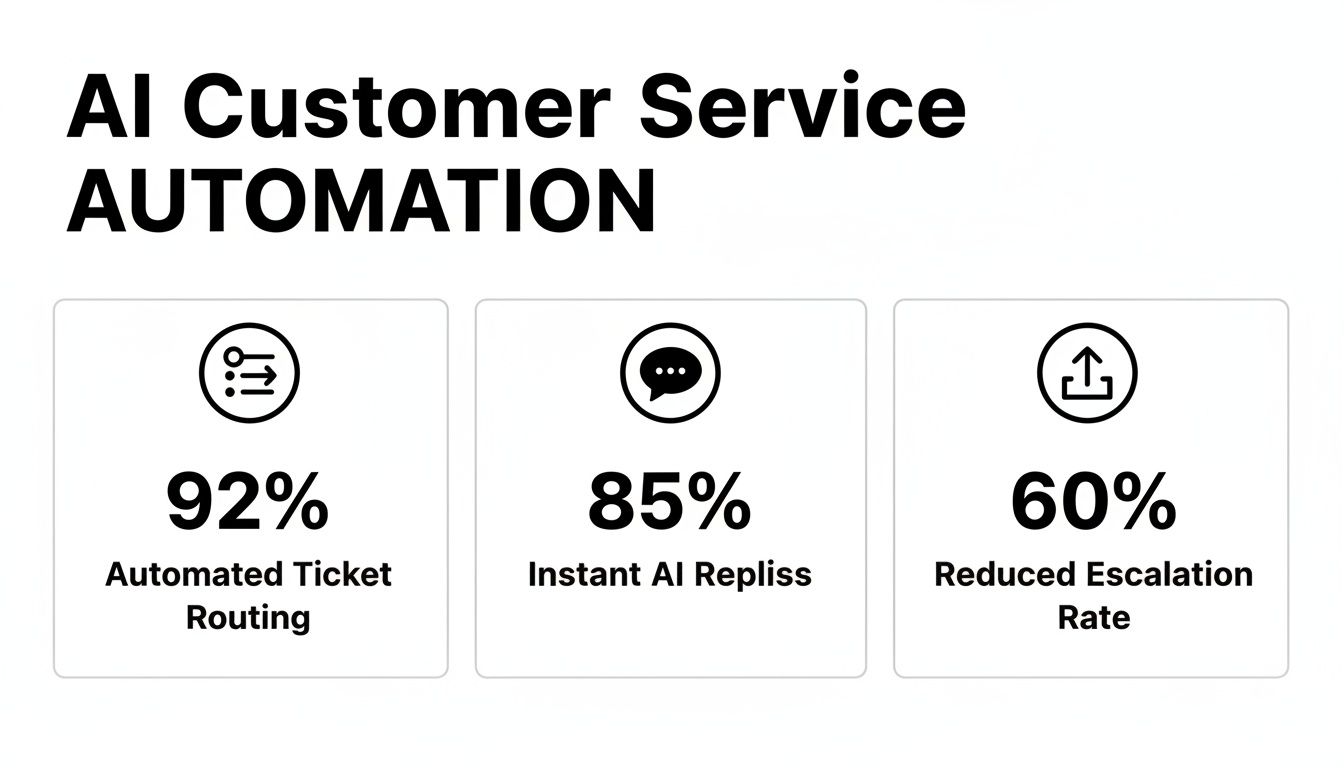
These numbers aren’t just for show. They represent real-world improvements in efficiency and customer experience driven by automation in routing, replies, and escalation.
Quantifying the Financial Gains
The financial case for AI-powered support is no longer a forecast; it’s a well-documented reality that gets the attention of business leaders. Take this for example: 40% of support organizations that implemented agent-assist AI saw a 27% reduction in average handle time. That’s not a minor tweak-it’s a massive efficiency boost that leads to substantial financial returns.
In fact, teams that pair human agents with AI assistants can handle 7.7% more simultaneous chats and see an average of $4.3 million in staffing cost savings. You can dig into these stats and their sources in this report on AI in customer service.
The financial upside comes from two main places: cost reduction and productivity gains. By automating all the routine questions, you don’t have to keep hiring more people just because your ticket volume is growing. At the same time, your existing team becomes exponentially more productive.
Support professionals using generative AI save over two hours per day. That’s time they can reinvest into solving tough customer problems and making your service even better.
From Cost Center to Value Driver
Ultimately, the goal is to completely change how the business views customer support. For too long, it’s been seen as a necessary expense. But with the right AI tools, your support team can become a proactive engine for keeping customers happy and even generating new revenue.
When your team is freed from the daily grind of repetitive tickets, they have more headspace to focus on what matters:
- Spot Upsell Opportunities: Agents can recognize when a customer’s needs are outgrowing their current plan and suggest a smart upgrade.
- Gather Product Feedback: With more time for real conversations, agents can collect invaluable insights to share directly with your product and engineering teams.
- Build Stronger Relationships: A positive, efficient support interaction is a cornerstone of customer loyalty. It’s what stops churn and increases lifetime value.
By bringing AI into your customer service operations, you’re not just trimming costs. You’re building a more scalable, efficient, and strategic support function.
Want to see what this could look like for your own team? Use tools like our help desk ROI calculator to get a real estimate of your potential savings and productivity gains. This kind of data-driven approach gives you a rock-solid business case for making the switch to a modern AI platform.
Your Practical Roadmap for AI Implementation
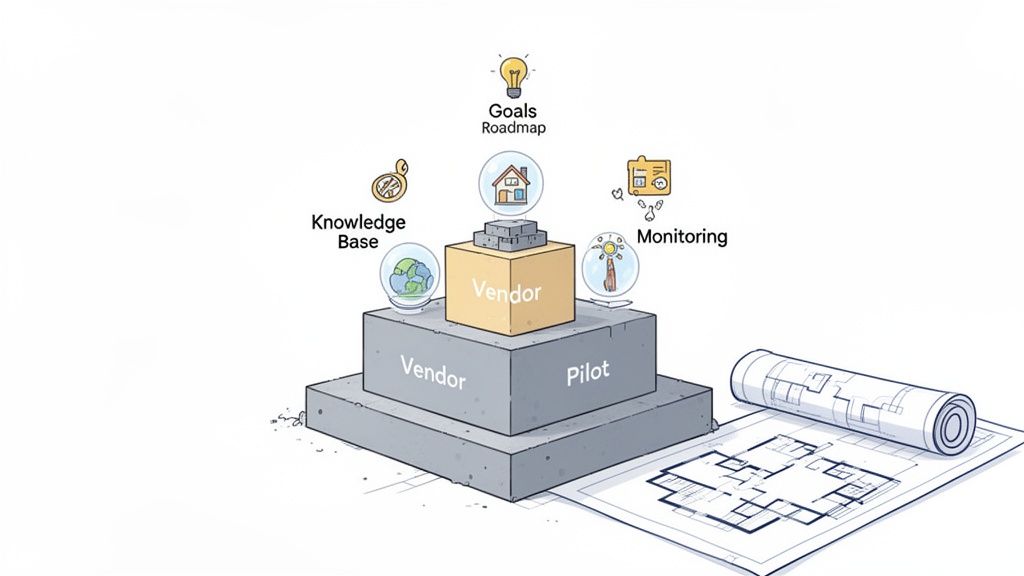
Getting AI for customer service up and running successfully doesn’t just happen. It takes a clear, deliberate plan. Think of it like building a house: you wouldn’t just start pouring concrete without a detailed blueprint.
In this case, your goals are the blueprint, and your knowledge base is the foundation. Trying to skip these first steps is a sure-fire way to end up with a wobbly structure that can’t handle any real-world pressure. Let’s walk through a practical roadmap to make sure your AI implementation is built to last.
Step 1: Define Your Goals and KPIs
Before you even glance at a single AI vendor, you need to know what success actually looks like for your team. What specific, nagging problem are you trying to fix? Fuzzy goals like “improve efficiency” just won’t cut it. You need concrete targets to steer the project and prove its worth down the line.
Start by digging into the biggest headaches in your current support process. Are agents buried under a mountain of password reset tickets? Is your first response time crawling? Nailing down these pain points is the key to setting clear, focused goals.
Here are a few examples of solid, measurable goals:
- Reduce First Response Time (FRT) by 30% in the first quarter by letting the AI handle common questions.
- Boost First Contact Resolution (FCR) by 15% by giving agents AI-powered reply suggestions.
- Automate 40% of all tier-1 tickets about billing within six months.
- Improve Customer Satisfaction (CSAT) scores for automated chats to an average of 4 out of 5 stars.
These Key Performance Indicators (KPIs) become your North Star. They’re the numbers you’ll use to track progress and show leadership that this was a smart investment.
Step 2: Prepare Your Knowledge Base
Here’s the simple truth: your AI is only as smart as the information you feed it. A clean, current, and complete knowledge base is the single most important piece of the puzzle. It’s the foundation your entire automated support system is built on.
If your help docs are scattered, outdated, or full of holes, the AI will spit out wrong or useless answers. That just frustrates customers and ends up creating more work for your team. Now is the time to do a serious content audit.
Your knowledge base isn’t just a resource for your AI; it’s the brain. A well-maintained brain leads to intelligent, accurate responses. A neglected one leads to confusion and poor performance.
Start by gathering all of your support content-FAQs, how-to guides, troubleshooting articles, internal wikis, you name it. Make sure every article is easy to read, straight to the point, and follows a consistent style. Ditch the old stuff and fill in any gaps you find based on your most common tickets. This upfront effort pays off big time.
Step 3: Choose the Right Vendor
With your goals set and your knowledge base in good shape, you can start looking for an AI partner. The market is crowded, but the right vendor is one that fits your specific needs, plays nice with the tools you already use, and can grow with you.
Don’t get distracted by flashy features. Focus on the basics. A huge factor is the setup process. Many modern platforms are built for speed, connecting to your knowledge base and starting to learn in minutes, not months. This means you start seeing a return on your investment much faster.
Step 4: Plan a Phased Rollout and Train Your Team
It’s tempting to flip the “on” switch for every customer and every issue at once. Don’t do it. A phased rollout is a much smarter and safer way to go. Kick things off with a small, controlled pilot program focused on a single, high-volume problem you identified back in the goal-setting stage.
For example, you could activate the AI just for “how-to” questions related to one specific product feature. This lets you test how it performs in a low-risk setting, collect feedback, and tweak things before you go bigger. This controlled launch helps you iron out the wrinkles and build confidence in the system.
At the same time, you need to get your human agents ready for their new AI teammate. Make it clear that this tool is here to handle the boring, repetitive stuff so they can focus on more complex, interesting problems. Give them solid training on how the new system works, including how to check AI-suggested replies and when to jump into an automated conversation.
Step 5: Monitor Performance and Iterate
Launching your AI isn’t the finish line-it’s the starting line. You have to keep monitoring and tweaking to get long-term results. Go back to those KPIs you set in step one and track them like a hawk.
Check your analytics dashboards regularly to see how the AI is doing. Are you hitting your response time targets? What are the CSAT scores for automated chats? This data will tell you what’s working and where you need to improve. Use what you learn to fine-tune the AI’s answers, update your knowledge base with new info, and slowly expand automation to other types of issues.
How to Choose the Right AI Helpdesk Platform
Picking an AI for customer service platform is a big decision. You’re not just buying another piece of software; you’re choosing a partner that will sit at the core of your support operations. The right choice can unlock huge efficiency gains and make customers happier. The wrong one? It can just create new headaches and frustrate your team.
To get it right, you have to look past the flashy marketing and dig into what really matters for your helpdesk day-to-day. We need a clear framework to evaluate the options, focusing on how a tool will actually fit into your workflow, whether you can trust it with your data, and if it can keep up as you grow. A little homework now ensures you’re investing in a solution that solves today’s problems and is ready for tomorrow’s.
Assess Integration Capabilities
Your AI helpdesk doesn’t work in a silo. It has to talk to all the other tools your business runs on-your CRM, your internal chat, everything. If it doesn’t, you end up with data islands and agents constantly switching between apps. That completely defeats the point of bringing in a tool to make things more efficient.
When you’re looking at vendors, ask for more than just a list of logos on their integration page. Get into the details. Can it sync customer data in real time? Can it turn a Slack message into a ticket or update a CRM record on its own? A platform like Ticketdesk AI is built with a modern API and solid documentation, designed to plug into your existing tech stack without a painful, drawn-out setup process.
Prioritize Security and Compliance
When you let an AI handle customer conversations, you’re handing over sensitive data. That makes security an absolute, non-negotiable priority. You need to be 100% confident that the platform meets the highest standards for data privacy and protection. A security breach traced back to a third-party tool can do serious, lasting damage to your brand and land you in legal trouble.
Start by asking potential vendors for their security certifications and proof of compliance with regulations like GDPR or SOC 2. A vendor who takes this seriously will have this information ready to go. They should be able to clearly explain their data encryption methods, who can access what, and what their plan is if something goes wrong.
Choosing a vendor with a strong security posture isn’t just a technical checkbox; it’s fundamental to keeping your customers’ trust. Your partner has to show a real commitment to protecting your data.
Evaluate Scalability and Performance
The platform you pick today has to be able to handle your support volume a year from now. Scalability isn’t just about managing more tickets. It’s about maintaining speed and accuracy as your customer base expands. A system that’s fine for a small startup can easily buckle under enterprise-level demand, causing slow responses and a terrible customer experience.
Ask vendors about their infrastructure. How do they handle sudden spikes in traffic? It’s also a good idea to ask about their AI models. Do they learn and get better from new interactions? A platform that continuously improves is an asset that grows in value over time, adapting as your customers’ needs change.
To keep this process organized, a checklist is your best friend. It forces you to look at every potential partner through the same critical lens, ensuring you make a decision based on facts, not feelings.
Here’s a simple checklist to get you started.
Vendor Selection Checklist for AI Helpdesk Software
| Evaluation Criteria | Why It Matters | Key Questions to Ask |
|---|---|---|
| Integration Power | Ensures the AI tool works with your existing software (CRM, chat, etc.) to create a unified workflow and avoid data silos. | Does it offer pre-built integrations for our key tools? Is there a well-documented API for custom connections? |
| Security Standards | Protects sensitive customer data and ensures you’re compliant with regulations like GDPR, preventing costly breaches. | What security certifications do you hold (SOC 2, ISO 27001)? How is our data encrypted at rest and in transit? |
| Scalability | Guarantees the platform can grow with your business without a drop in performance, speed, or accuracy. | How does the system handle sudden increases in ticket volume? Does the AI model continuously learn and improve? |
| Vendor Support | Provides expert help during setup and ongoing optimization to ensure you get the most value from your investment. | What does your onboarding process look like? What are your support team’s hours and typical response times? |
Using a structured approach like this turns a complicated decision into a manageable one. It helps you focus on the features that will actually drive results for your business and find a partner you can rely on for the long haul.
Common Questions About AI in Customer Service
Jumping into the world of AI for customer service always brings up a few big questions. As a support leader, you need to be sure you’re making the right move for your team, your customers, and your bottom line. I get it.
Let’s cut through the noise and tackle some of the most common concerns I hear from teams evaluating this kind of tech.
Will AI Replace My Human Customer Service Agents?
This is usually the first question on everyone’s mind, and it’s a completely fair one. The short answer is no. A modern AI system is designed to supercharge your team, not replace it. The best setups create a powerful partnership between human expertise and machine efficiency.
Think of AI as the ultimate assistant. It’s fantastic at handling all the repetitive, high-volume tasks that can lead to agent burnout-things like password resets, checking on an order status, or answering basic “how-to” questions. This frees up your skilled agents to focus on what they do best: solving complex, high-stakes problems that demand real empathy and critical thinking.
I tell every team the same thing: think of AI as a force multiplier, not a replacement. It empowers each agent to handle more meaningful work and deliver higher-value service. It turns a good team into a great one.
Instead of getting rid of jobs, AI is changing them for the better. Agents who used to spend their days answering the same three questions can now become product specialists or customer success advocates. It’s all about elevating the role of your support team, not eliminating it.
How Difficult Is It to Set Up and Maintain an AI Support System?
The fear of a long, painful setup process stops a lot of teams in their tracks. A few years ago, that fear was justified. Implementing AI often meant hiring developers and spending months on custom coding. Thankfully, those days are long gone.
Modern AI for customer service platforms, like Ticketdesk AI, are built to be simple and fast. We’re talking about a setup that takes minutes, not months. The main job is just connecting the AI to your existing sources of truth, like:
- Your Knowledge Base: All your FAQs and help articles.
- Company Documentation: Internal guides, product specs, and policy manuals.
- Past Tickets: Your history of support conversations is a goldmine for teaching the AI.
Once you connect these sources, the AI starts learning right away. Maintenance is just as simple. It mostly comes down to keeping your knowledge base up-to-date, which you should be doing anyway. You’ll also want to glance at the AI’s performance analytics every so often to see where you can improve your documentation. The whole point is a low-effort system that starts delivering value immediately.
How Do I Measure the ROI of AI in Customer Service?
Proving a clear return on investment (ROI) is everything. You need hard numbers to get buy-in and show that the tool is actually working. Measuring AI’s impact is pretty straightforward-it’s all about tracking a few key metrics before and after you launch.
Build your business case around tangible improvements in these areas:
- Cost Savings from Automation: This one is easy. Count the number of tickets your AI resolves without anyone touching them. Multiply that by your average cost-per-ticket, and you’ve got a direct, hard-dollar saving.
- Productivity Gains: Look at your Average Handle Time (AHT) and First Response Time (FRT). When those numbers drop, it means your agents are resolving issues faster and can handle more conversations. You’ve increased your team’s capacity without hiring.
- Better Customer Outcomes: Keep an eye on First Contact Resolution (FCR) and Customer Satisfaction (CSAT). When these metrics go up, it’s proof that customers are getting better, faster answers-which is what drives loyalty and keeps them coming back.
Just make sure you get a baseline for these metrics before you start. That way, you can create a powerful report that shows exactly how your AI investment is paying off.
What Kind of Data Does the AI Need to Be Effective?
An AI is only as smart as the information you feed it. Its ability to give accurate, helpful answers comes down to one thing: the quality of your data.
To do its job well, the AI needs access to comprehensive, well-organized documentation. The best data sources are:
- A Detailed Knowledge Base: This is non-negotiable. Your knowledge base should have clear, concise articles that cover common customer questions and problems.
- Up-to-Date User Guides: If you have a technical product, your user manuals are an invaluable resource for the AI.
- Internal Process Docs: Information on your shipping policies, return procedures, or billing practices helps the AI answer a much wider range of questions.
The cleaner and richer this source material is, the better your AI will perform. It’s an ongoing partnership-as you create new documentation for your customers and team, you’re also continuously training your AI assistant to be even better.