Automated Ticket Routing: Understanding automated ticket routing in practice
What Is Automated Ticket Routing Anyway?
Imagine your support inbox is a busy airport. Without an air traffic controller, planes (which are your support tickets) would circle endlessly, causing chaos, delays and a whole lot of frustrated passengers. Someone has to manually check each plane’s flight plan, destination and priority before guiding it to the correct gate. That’s a slow, expensive and error-prone job.
For a lot of support teams, this isn’t just an analogy-it’s their daily reality. A manager or senior agent spends hours every single day just reading new tickets, trying to figure out what they’re about, and then assigning them to the right person. A billing question goes to finance, a bug report goes to the engineers, and a simple password reset goes to a junior agent. This manual triage creates a massive bottleneck that your customers feel immediately.
The Problem with Manual Sorting
Doing this all by hand isn’t just inefficient; it’s a real threat to customer satisfaction and keeping your operations stable. As your company grows and more tickets pour in, the cracks in the manual process start to show.
- Slow Response Times: Every minute a ticket sits in an “unassigned” queue is another minute a customer is left waiting for help. That initial delay sets a poor tone for the rest of their experience.
- High Operational Costs: You’re literally paying skilled agents to do repetitive admin work instead of solving tricky problems. Their time is your most valuable asset, and manual sorting is a terrible use of it.
- Increased Agent Burnout: Forcing your experienced staff to play dispatcher is a fast track to frustration and burnout. They signed up to help customers, not to play hot potato with a queue.
Automated ticket routing is the fix for this operational headache. It’s an intelligent system that instantly analyzes, categorizes and sends incoming requests to the perfect destination-no human intervention needed.
At its core, automated ticket routing transforms a chaotic, first-in-first-out queue into a streamlined, priority-aware workflow. It’s about getting the right problem to the right person at the right time, every single time.
This isn’t just a niche tool anymore; it’s becoming a cornerstone of modern customer service. The market numbers back this up: the AI-for-customer-service market was valued at USD 12.06 billion in 2024 and is projected to skyrocket to USD 47.82 billion by 2030.
By automating this critical first step, you’re laying the foundation for a faster, smarter, and more scalable support operation. The powerful automation https://ticketdesk.ai/features in Ticketdesk AI are designed to do exactly this, turning your support team from a cost center into a powerhouse of efficiency.
Choosing Your Automated Routing Engine
When you decide to bring in automated ticket routing, one of the first big choices you’ll make is the “engine” that powers it all. This isn’t just a small technical detail-it shapes how smart, flexible, and scalable your whole support operation will be.
Think of it like picking a vehicle for a delivery service. You could go with a dependable truck that always follows the same predetermined route. Or maybe you need an agile off-roader that can navigate any terrain. Or, perhaps, something that combines the best of both.
Each approach has its own set of strengths and is built for different kinds of businesses. Getting to know these core models-Rule-Based, AI-Powered, and Hybrid-is the first real step toward a system that doesn’t just shuffle tickets around, but actively makes your customer experience better.
Rule-Based Routing: The Straightforward Operator
The classic, most traditional form of automation is Rule-Based Routing. This engine works like a super-efficient mail sorter, following a clear set of “if-then” instructions that you create. If a ticket contains the word “invoice,” then it goes to the billing department. If a customer is tagged as a “VIP,” then their ticket gets a high-priority flag. Simple.
This method is direct, predictable, and relatively easy to get up and running. You’re in complete control of the logic, making it a great starting point for teams just dipping their toes into automation.
But its biggest strength-its simplicity-is also its biggest weakness. A rule-based system only knows what you’ve explicitly told it. It can’t pick up on nuance, slang, or a customer’s frustrated tone if the right keywords aren’t there. As your business grows and customer problems get more complex, you can quickly find yourself buried under a tangled mess of hundreds of rules that are a nightmare to manage.
AI-Powered Routing: The Seasoned Detective
This is where AI-Powered Routing completely changes the game. Instead of just following a script, this engine acts more like a seasoned detective. It uses Machine Learning (ML) and Natural Language Processing (NLP) to look at incoming tickets and figure out the context, intent, and sentiment-not just specific keywords.
An AI model can understand that “my payment failed” and “I can’t update my card info” are both billing issues, even if the word “billing” never appears. It can detect the urgency in someone’s writing and automatically bump up the priority. This is the kind of intelligence that makes a routing process feel truly dynamic.
AI-powered systems actually learn from your past ticket data. The more they see, the better and more accurate they get at sorting and routing tickets, adapting to new problems without you having to write a new rule for every little thing.
For example, Ticketdesk AI is designed to continuously analyze your knowledge base and historical tickets. This helps it learn the specific language of your business, allowing it to make routing decisions that are far more on-the-money than rigid rules could ever be.
The Hybrid Approach: Best of Both Worlds
For most companies that are growing, the best answer isn’t picking one or the other. It’s using a combination of both. A Hybrid Approach uses the clean logic of rules for the simple stuff while letting the AI handle the trickier, more complex analysis.
This balanced model gives you the perfect mix of control and raw intelligence. You can set hard, unbreakable rules for your most critical workflows and let the AI deal with the messy, unpredictable nature of human conversation.
Think about these situations:
- A Hard Rule: “If a ticket comes from an email address of a key enterprise client, it always goes to the Tier 3 support queue.” This is a business rule that can’t be bent.
-
An AI Assist: The AI then reads that same ticket and adds helpful tags like
Bug ReportorFeature Request, giving the Tier 3 agent a head start before they even open it.
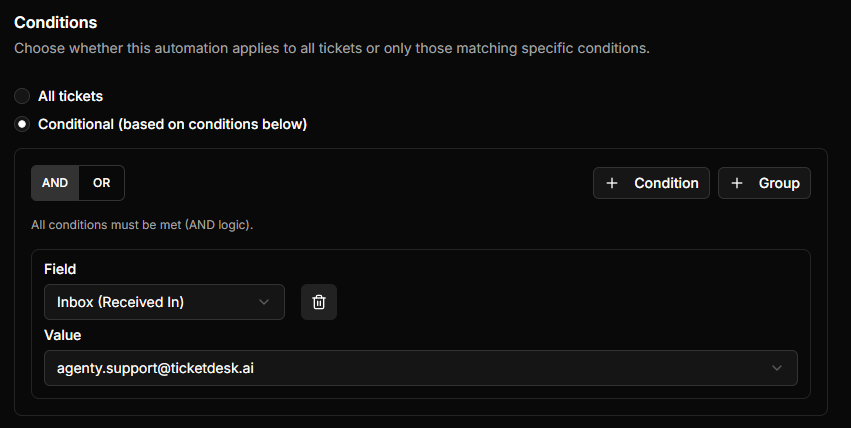
This kind of teamwork makes for a seriously robust and sophisticated routing strategy. In fact, one recent industry analysis found that AI-assisted routing can lead to a 20-30% reduction in response times simply because it takes all the guesswork out of the equation.
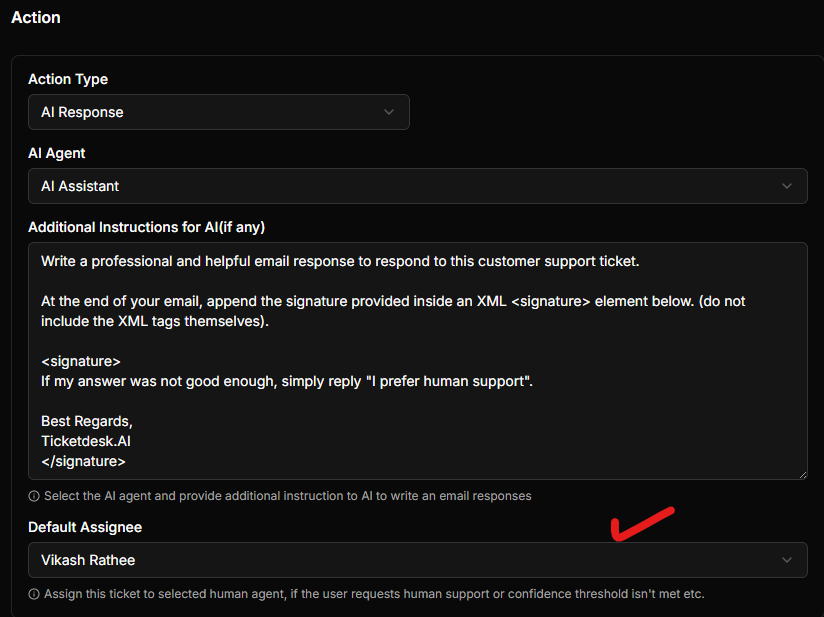
To help you figure out what makes the most sense for your team, we’ve broken down how these three engines stack up against each other.
Comparing Ticket Routing Approaches
This table contrasts the three main methods of automated ticket routing across key attributes to help you decide which is best for your needs.
| Attribute | Rule-Based Routing | AI-Powered Routing (ML/NLP) | Hybrid Routing |
|---|---|---|---|
| Accuracy | High for predefined scenarios, but struggles with ambiguity. | Very high, as it understands context and learns over time. | Exceptionally high, combining rigid accuracy with contextual understanding. |
| Setup Complexity | Low. Based on simple “if-then” logic that is easy to configure. | Moderate. Requires historical data for the model to learn effectively. | Moderate to High. Involves configuring both rules and the AI model. |
| Scalability | Poor. Becomes difficult to manage as ticket volume and complexity grow. | Excellent. Adapts to new and evolving customer issues without manual updates. | Excellent. The AI handles complexity while rules manage core processes. |
| Best For | Small teams with predictable and low-volume support requests. | High-growth companies with diverse and complex customer inquiries. | Most businesses seeking a balance of control, intelligence, and scalability. |
Ultimately, choosing the right engine really comes down to where your company is at and what you’re trying to achieve. While rules are a perfectly fine place to start, a hybrid or fully AI-powered system is what will really unlock that next level of efficiency and keep your customers happy.
The Real-World Payoff of Smart Routing
It’s one thing to understand the mechanics of automated ticket routing, but it’s another thing entirely to see how that tech translates into real business results. Let’s move past the technical “how” and dig into the business “why.” Smart routing isn’t just about shuffling tickets faster; it’s about fundamentally rewiring your entire support operation for the better.
The benefits start small and ripple outwards, touching everything from your team’s daily grind to your company’s bottom line. When every single request is instantly analyzed and sent to the right person, you obliterate the biggest bottleneck in most support workflows: the manual triage queue. That one change sets off a chain reaction of positive outcomes.
Slash Response Times and Boost Efficiency
The first thing you’ll notice is a massive leap in speed. When a ticket no longer has to sit around waiting for a human to read it, categorize it, and then assign it, your time to first response plummets. That initial reply sets the tone for the entire customer conversation.
But the efficiency gains run much deeper than that first “hello.”
- Balanced Agent Workloads: Tickets get distributed based on agent skills, expertise, and even their current workload. This stops your top-tier experts from getting buried under simple password resets and ensures complex problems get the brainpower they deserve.
- Shorter Handling Time: When a ticket lands in the right inbox with all the necessary context, the agent can dive straight into solving the problem. No more wasting time trying to figure out what the issue is or bouncing it to another department.
- Scale Through Spikes: Automated systems handle sudden surges in ticket volume without needing you to hire more people. The routing is instant, preventing backlogs from spiraling out of control during your busiest hours or a product launch.
And the data backs this up. A review of performance metrics from 2021 to 2024 shows that teams using AI-powered routing saw response-time reductions of 20-30% and first-contact resolution improvements of 25-30% compared to manual methods. You can dive deeper into these performance benchmarks on wizr.ai.
Elevate the Customer Experience
Here’s a simple truth: customers don’t care about your internal processes. They just want fast, correct answers. Automated routing is built for this.
Getting a ticket to the right expert on the first try means the customer isn’t stuck in a frustrating loop of being transferred and having to explain their problem over and over again.
Inaccurate routing is a silent killer of customer loyalty. Every time a customer has to repeat their issue to a new agent, their confidence in your brand erodes. Smart routing protects that trust by getting it right the first time.
This accuracy leads directly to higher Customer Satisfaction (CSAT) scores. When people feel heard and helped without any friction, they’re far more likely to stick around and even recommend you to others. It turns customer support from a necessary cost into a powerful, positive part of your brand.
Empower Your Most Valuable Asset: Your Agents
Finally, let’s talk about the people on the front lines. Your support agents are crucial, and their well-being directly impacts the quality of your service. Manually sorting tickets is a monotonous, soul-crushing task that’s a major driver of agent burnout.
By automating that chore, you free up your team to focus on what they were hired for: solving tricky problems and building real relationships with customers. This single change can have a massive impact on team morale. Agents feel more valued when their work is meaningful, which slashes turnover and helps you keep your best people. Automated ticket routing lets them operate at their peak, turning a support team from a cost center into a value-generating engine for your business.
A Practical Implementation Roadmap
Getting automated ticket routing up and running isn’t just about flipping a switch. Think of it less like installing a new app and more like designing a hyper-efficient logistics network for your support team. A thoughtful rollout is the key to getting the results you want, avoiding common headaches, and setting your team up for success.
This roadmap breaks the whole process down into bite-sized phases, from the initial whiteboard session to post-launch tweaking. By following a clear, structured approach, you can deploy a system that starts adding value from day one.
This flow shows how the benefits of smart routing ripple through an organization, boosting efficiency, delighting customers, and empowering your agents.
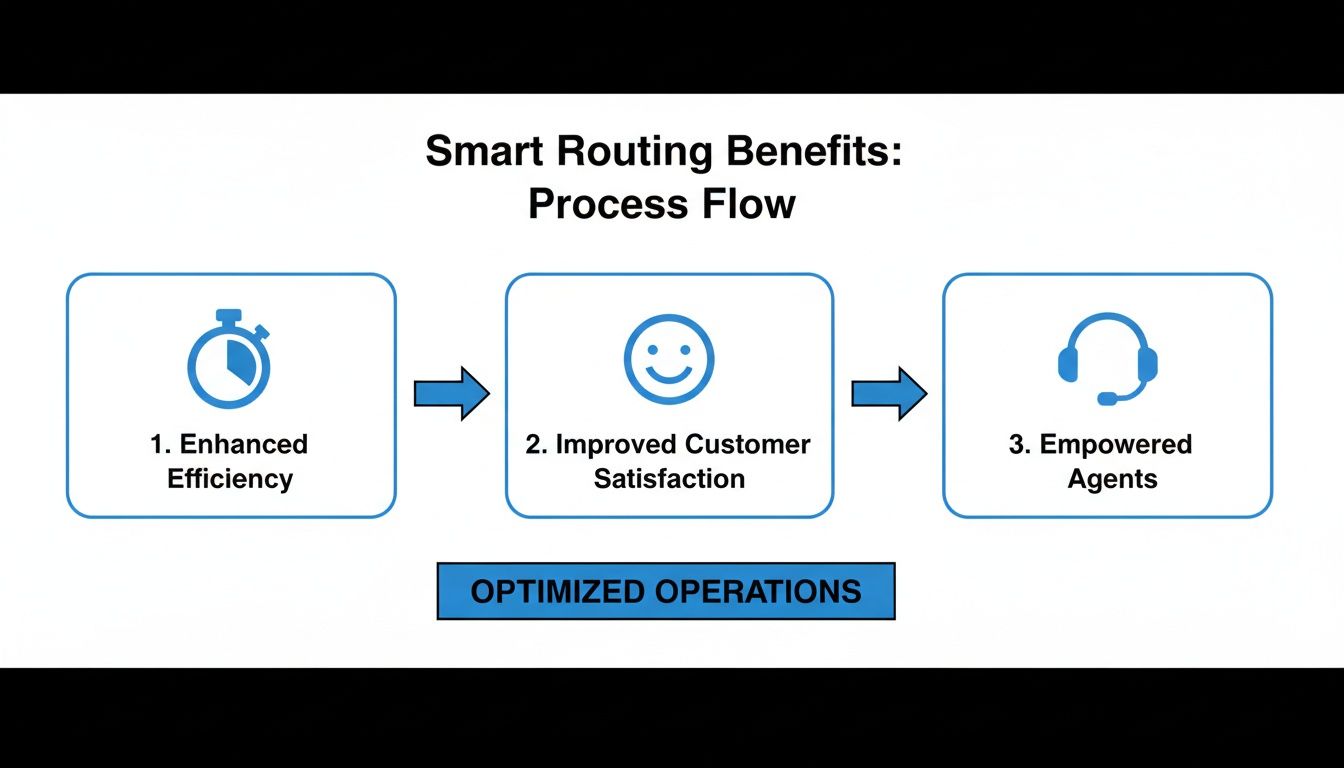
The main takeaway here is that these wins are all connected. When you improve one area, like your team’s efficiency, it naturally leads to better experiences for everyone involved.
Phase 1: Define Your Goals and Audit Your Data
Before you write a single rule or train an AI model, you have to know what you’re aiming for. Clear goals will steer every decision you make. Are you trying to slash your first response time, nail more resolutions on the first try, or just spread the workload more evenly among your agents?
Start by asking the hard questions:
- Where are the biggest traffic jams in our current ticket process?
- Which types of tickets take up the most manual sorting time?
- What specific number are we trying to improve (e.g., cut Average Handle Time by 15%)?
Once your goals are crystal clear, it’s time for a data audit. Your new routing system, especially an AI-powered one, is only as smart as the data it learns from. You need to take a good, hard look at your historical ticket data.
Hunt for messy tags, old categories, or tickets missing key information. A successful AI model depends on clean, well-organized data to spot patterns and make accurate decisions. This is the foundation you’ll build everything on.
Phase 2: Design and Configure Your Routing Logic
This is where you start drawing the map for every incoming ticket. The mission is to build a logical framework that sends each request exactly where it needs to go, fast. If you’re using a hybrid approach, this means you’ll be setting up both your hard-and-fast rules and the parameters for your AI.
Start by sketching out your main ticket categories and matching them to the teams or agents who are best at handling them. For instance:
- Billing Inquiries: Any ticket with keywords like “invoice,” “refund,” or “subscription payment” gets routed straight to the Finance team.
- Technical Bugs: Tickets mentioning things like “error message,” “not loading,” or “API key issue” go directly into the Engineering queue.
- Feature Requests: All those great ideas and suggestions? Send them over to the Product team for review.
It’s absolutely crucial to bring your frontline agents into this process. They have the real-world, on-the-ground knowledge of customer issues and can spot the little details a top-down plan might miss. For developers looking to build out custom integrations, you can find everything you need in the Ticketdesk AI API documentation.
A common mistake is to make the logic way too complicated right from the start. Begin with your most frequent and obvious scenarios. You can always layer in more complexity and fine-tune the system later on, once you have real performance data to work with.
Think of this design phase as an iterative loop. Create a flowchart or a simple document that visually lays out the routing paths. This “map” becomes your blueprint for the technical setup and ensures everyone on the team is on the same page.
Phase 3: Launch, Monitor, and Refine
Hitting the “go” button on your automated routing system isn’t the finish line-it’s the starting pistol for continuous improvement. A phased rollout is usually the safest bet. You could start by automating routing for just one channel, like email, or for a single ticket category before going all-in.
Once the system is live, you need to watch it like a hawk. Keep a close eye on the key performance indicators (KPIs) you set back in phase one. Pay special attention to:
- Misrouted Tickets: Are tickets constantly landing in the wrong place? That’s a dead giveaway that a rule needs tweaking or the AI model needs more training.
- Agent Feedback: Your support team will be the first to know if something feels off. Set up a simple way for them to report issues and suggest improvements.
- Customer Satisfaction (CSAT): Keep tabs on your CSAT scores. A well-oiled system should make customers happier because they’re getting faster, more accurate help.
This data-driven feedback loop is what separates a good implementation from a great one. Regularly check your performance reports and chat with your team about what’s working and what isn’t. When you treat your routing system as a living tool that grows with your business, you ensure it stays a powerful asset for your entire support operation.
How to Measure Success and Prove ROI
Putting an automated ticket routing system in place is a huge win, but the real work starts when you have to prove it was worth it. How do you actually translate smoother operations and happier agents into a business case that gets the C-suite excited?
The trick is to move beyond just saying “things feel better” and start tracking hard numbers. Success isn’t just a feeling; it’s a number. By keeping a close eye on the right Key Performance Indicators (KPIs), you can draw a straight line from your automation investment to real improvements in efficiency, customer happiness, and, most importantly, the bottom line. This is how you justify the initial cost and keep the budget coming.
Essential KPIs to Track
To paint a clear picture of your success, you don’t need a hundred different metrics. Just focus on a few high-impact ones that automation directly affects. Think of these as your “before and after” snapshot.
Here’s what you should be watching:
- First Contact Resolution (FCR): What percentage of tickets are you solving in a single touch? Smart routing gets tickets to the right expert from the get-go, which sends this number soaring. No more bouncing customers around.
- Average Handle Time (AHT): This is the clock-time an agent spends actively working on a ticket. When tickets arrive pre-sorted and full of context, agents can skip the guesswork and dive right into solving the problem, driving AHT down.
- Ticket Backlog: A backlog that never shrinks is a classic sign that your team is drowning. Automation acts like a traffic controller, distributing new tickets instantly so queues don’t pile up.
- Ticket Reassignment Rate: How often is a ticket passed around like a hot potato? A high reassignment rate means chaos and confusion. Good routing crushes this metric by getting it to the right person the first time.
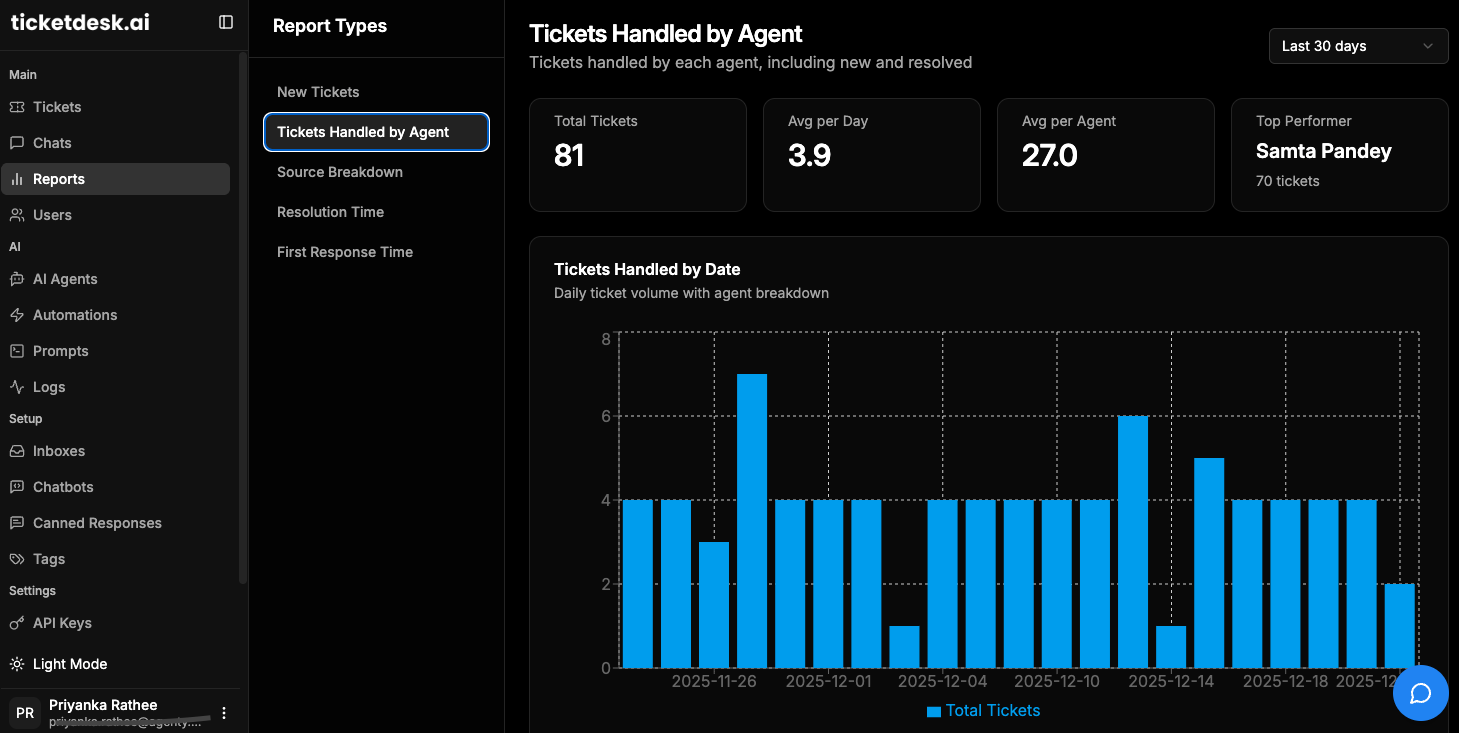
When you track these, you can build a simple dashboard that shows everyone exactly how the system is making a difference.
Calculating Your Return on Investment
Operational metrics are great for the team, but leadership speaks one language fluently: money. Calculating your Return on Investment (ROI) is how you translate better KPIs into dollars and cents. The goal is simple: show that the money you’re saving is more than the money you spent.
The heart of any solid ROI calculation is connecting improved efficiency to lower costs. Every minute your team isn’t spending on manual sorting, and every ticket solved faster, directly helps your company’s bottom line.
So, where do you start? The biggest savings almost always come from two places: reducing manual labor and hitting your Service Level Agreements (SLAs) more consistently. In fact, it’s common for companies to see labor-related cost savings of 10-40% on triage alone after implementing automation. The system often pays for itself in just 6 to 18 months.
The basic formula for ROI is pretty straightforward:
ROI (%) = [(Financial Gain - Cost of Investment) / Cost of Investment] x 100
Here’s how to figure out the “Financial Gain” part:
- Calculate Labor Cost Savings: First, figure out how many hours your team used to spend every week just sorting and assigning tickets. Multiply that by your average agent’s hourly wage. That’s your old “cost of sorting.” After automation, that cost should be nearly zero-that’s pure savings.
- Quantify Productivity Gains: Look at how much your Average Handle Time has dropped. A 10% reduction in AHT across a team of 20 agents is like getting two extra full-time agents for free.
- Factor in Customer Retention: This one is a bit trickier to measure, but it’s incredibly valuable. Happier customers, who get their problems solved faster, stick around longer. Even a tiny bump in customer retention can have a massive financial impact over the year.
For a precise calculation based on your team’s size, salaries, and ticket volume, give our help desk ROI calculator a try. It’ll help you build a data-backed argument that proves the long-term value of investing in smart automation.
Common Mistakes and How to Avoid Them
Rolling out an automated ticket routing system can feel like a massive win, but a few common missteps can easily turn a promising project into a frustrating mess. The fastest way to succeed is to learn from the mistakes others have made. If you can sidestep these predictable pitfalls, you’ll build a system that actually delivers from day one.
The most common error I see is teams trying to build a sophisticated system on a shaky foundation. They get so excited about the automation possibilities that they completely ignore the quality of their historical data. Feeding an AI model messy, inconsistent, or poorly tagged tickets is like trying to teach a student with a textbook full of typos-the results are going to be chaotic and unreliable.
Another classic pitfall is getting tangled up in complexity. It’s tempting to create a specific rule for every single scenario you can imagine. Before you know it, you’ve woven a complex web of logic that’s impossible to manage, let alone troubleshoot. Once a rule set gets that complicated, it breaks easily, and nobody on the team has any idea how it works anymore.
Neglecting Your Most Valuable Resource
But perhaps the biggest mistake of all is failing to bring your frontline agents into the design process. These are the people who live and breathe customer issues every single day; they understand the nuances better than anyone. Designing a system without their input is like drawing a map of a city you’ve never visited-it’s guaranteed to be wrong.
Your support agents aren’t just the end-users of the system; they are your subject matter experts. Ignoring their insights is the single biggest reason why routing implementations fail to meet expectations. They know which problems get escalated and why.
To steer clear of these issues, think in terms of problems and solutions:
- Problem: Training AI on “dirty” data. The system starts making bizarre routing decisions because it learned from years of inconsistent ticket tags and jumbled categories.
- Solution: Do a thorough data audit before you start. Clean up your historical tickets, standardize your tags, and create clear data rules for the future. A little bit of data hygiene upfront will save you from massive headaches down the road.
Keeping Your Logic Clear and Actionable
Finally, you have to make sure the system you build today is still manageable six months from now.
- Problem: Over-engineering the rule-based logic. Your system becomes a fragile, unmanageable maze of “if-then” statements that everyone is too scared to touch or update.
- Solution: Start simple and iterate. Pick your top five or ten most common ticket types and automate those first. I always recommend a hybrid approach: use simple, unbreakable rules for the clear-cut stuff and let an AI like Ticketdesk AI handle the complex, nuanced requests that require more judgment.
By focusing on clean data, simple logic, and close collaboration with your agents, you can avoid the most common stumbling blocks. This approach ensures your automated ticket routing system is not just powerful, but also practical, sustainable, and actually embraced by the team who relies on it every single day.
Frequently Asked Questions
Even with a solid plan, a few questions always pop up when you’re getting started. Let’s tackle some of the most common ones we hear about automated ticket routing.
How Much Historical Data Do I Need for AI Routing?
This is the big one, right? While there’s no single magic number, a good rule of thumb is to have at least 1,000 to 2,000 resolved tickets for each major category you want the AI to handle.
But here’s the thing: quality trumps quantity every time. A smaller, well-organized set of tickets with clean tags and consistent categories is way more valuable than a massive, messy archive. You’re trying to give the AI good, clear examples to learn from, not just a mountain of data.
Can Automated Systems Handle Multiple Languages?
Absolutely. Modern AI-powered systems are built for a global world. Platforms like Ticketdesk AI use sophisticated Natural Language Processing (NLP) models that can instantly detect a ticket’s language.
From there, it’s simple: the system routes the ticket straight to an agent who’s fluent in that language. This way, your non-English speaking customers get the same fast, expert service as everyone else.
What Is the Difference Between Routing and Assignment?
It’s easy to mix these two up, but the distinction is pretty important. Let’s use a mailroom analogy to clear it up.
- Routing is the first step-sorting the mail into the right department’s bin. Is this a billing question? Does it belong to tech support? That’s routing.
- Assignment is what happens next. A specific person in that department picks up a piece of mail from the bin to actually work on it.
So, automated routing gets the ticket to the right team queue. From there, assignment rules can kick in to give it to a specific agent based on their workload or availability.
How Do I Prioritize Tickets from VIP Customers?
This is a perfect spot for a hybrid routing model. You can set up a rock-solid, non-negotiable rule that flags any ticket coming from an account you’ve tagged as “VIP” or “Enterprise.”
The system just needs to identify the customer-usually by their email domain or user profile-and it can instantly apply a “High Priority” tag. Then, it zips that ticket straight to a dedicated senior support queue, letting it jump the line completely.

Ready to get started?
Join hundreds of teams using Ticketdesk AI to deliver exceptional customer support.