Fix Your Customer Service Escalation Process and Stop Losing Clients
A customer service escalation process is simply the formal game plan for handling issues that your frontline team can’t solve on their own. It’s the playbook that ensures tricky or sensitive problems get routed to the right people-those with the expertise or authority to actually fix things.
Without a solid process, you’re not just risking customer frustration; you’re putting your brand’s reputation on the line.
Why your Escalation process is quietly costing you customers
We’ve all been there. That sinking feeling when a simple support ticket suddenly spirals into a full-blown, brand-damaging crisis. It’s a support manager’s worst nightmare. But a flawed (or nonexistent) escalation process isn’t just an operational headache. It’s a silent killer of your bottom line, bleeding revenue through customer churn and burning out your best agents.
When an escalation goes wrong, chaos is never far behind.

This isn’t just about having tidy procedures. It’s a core piece of your customer retention strategy. Every single mismanaged ticket chips away at loyalty, turning a solvable problem into a customer’s reason to walk away.
The real-world scenario of a mismanaged ticket
Picture this: “Jane,” a customer at a SaaS company, finds a recurring bug. It’s blocking her team from getting their work done. The Tier 1 agent she contacts follows a script, offers a generic workaround that doesn’t really help, and closes the ticket.
Frustrated, Jane reopens it. This time it gets escalated, but the handoff is a mess. The Tier 2 agent has zero context and makes Jane explain the whole thing from the beginning. This painful back-and-forth drags on for days. By the time it finally lands with an engineer who spots the bug in minutes, the damage is already done. Jane is already demoing your competitor’s product.
This isn’t just a hypothetical. When customers have to fight their way through support, they get angry. In fact, 63% of customers have experienced what’s called ‘customer rage’ while trying to resolve an issue over and over again.
Jane’s story shines a light on the pain points that keep support managers up at night:
- Lost Context: Nothing infuriates a customer more than having to repeat their story. It’s a massive waste of everyone’s time.
- Agent Burnout: Frontline agents feel completely powerless when they can’t solve problems, which is a fast track to high turnover.
- Delayed Resolutions: Without a clear path, tickets just sit in a queue, blowing past your SLAs and eroding customer trust.
- Brand Damage: It only takes one awful experience to spark a fire on social media, tarnishing the reputation you’ve worked so hard to build.
Knowing how to handle an angry customer is a critical skill, especially when things go sideways and an escalation is needed. This is about more than just fixing one ticket; it’s about saving the entire customer relationship.
The need to design a modern, efficient, and maybe even AI-powered customer service escalation process has never been more urgent. Think of it as the safety net that protects both your customers and your business.
Defining your tiers and triggers for clear Escalation paths
Before you can build an escalation process that actually works, you need a solid blueprint. This is where you move from vague ideas to a concrete framework, defining exactly what warrants an escalation and who should handle it.
Without this clarity, agents are left guessing during stressful situations, which leads to inconsistent service and seriously frustrated customers. A well-defined structure ensures every problem follows a predictable and efficient path to the right person.
Establishing your support tiers
Most teams find a tiered support model is the way to go. This structure organizes your people by expertise. Simple issues get resolved fast by your frontline agents, while the really tough problems get routed to specialists without getting stuck in the queue. A three-tier system is a classic for a reason-it works.
-
Tier 1 (Frontline Support): These are your first responders. They handle the high volume of common stuff-password resets, basic “how-to” questions, and initial troubleshooting. Their goal is to solve as many issues as they can on that first contact.
-
Tier 2 (Technical or Product Specialists): When a problem needs a deeper look, it goes to Tier 2. This team has specialized knowledge to investigate more complex issues like software bugs, tricky configuration problems, or advanced account issues.
-
Tier 3 (Subject Matter Experts/Engineers): This is your final level of support, usually made up of engineers, developers, or senior product managers. They tackle the gnarliest problems-think critical system bugs, security vulnerabilities, or anything that requires a change in the code.
This tiered approach keeps your top experts from getting bogged down with basic questions, letting them focus where they can make the biggest impact.
Setting specific escalation triggers
Once you know your tiers, you need to create specific, measurable escalation triggers. These are the hard-and-fast rules that tell an agent when it’s time to pass a ticket up the chain. Vague guidelines like “escalate when it gets difficult” just don’t cut it.
Good triggers are black and white, and often data-driven. For instance, knowing the ins and outs of common shipping issues, like understanding shipment exceptions and delays, helps your team create specific triggers and manage customer expectations from the get-go.
Think about triggers in these categories:
- Time-Based Triggers: An issue gets escalated if it sits in a queue for too long. (e.g., “Escalate if unsolved in Tier 1 for more than 4 hours.”)
- Topic-Based Triggers: Certain problems automatically go to specialists. (e.g., “All refund requests over $500 go straight to the billing team.”)
- Sentiment-Based Triggers: With AI tools, you can automatically escalate tickets when a customer is clearly angry or frustrated.
- Severity-Based Triggers: An issue impacting lots of customers or a core business function, like a system-wide outage, gets escalated immediately. You can dig deeper into how to prioritize tickets in Ticketdesk AI to manage this on the fly.
To make this more concrete, here’s a quick look at how you might structure your own tiers and triggers.
Example escalation tiers and triggers
| Tier Level | Primary Responsibility | Example Escalation Triggers |
|---|---|---|
| Tier 1 | First-contact resolution for common issues | - Issue unresolved after 2 hours |
- Customer expresses high negative sentiment
- Request involves a known bug |
| Tier 2 | In-depth technical troubleshooting and analysis | - Issue requires database access or log analysis
- Customer reports a potential security flaw
- Multiple customers report the same new issue |
| Tier 3 | Code-level fixes and deep system analysis | - A confirmed, system-wide critical bug
- A verified security vulnerability
- Feature requests from a major enterprise client |
This table is just a starting point, of course. The key is to customize these rules to fit your product, your team, and your customers.
An effective escalation process is a loyalty goldmine. First-contact resolution stands as the number one driver of customer loyalty, even outpacing agents who go above and beyond. Yet, a recent report found that 33% of customers still get frustrated by having to repeat their issue during an escalation.
By creating this clear structure of tiers and triggers, you’re building the foundation for a seamless escalation process. It kills confusion, empowers your agents to make confident decisions, and ensures every customer gets their problem handled by the right person, every time.
How to build a practical escalation matrix and set SLAs
Once you’ve nailed down your tiers and triggers, it’s time to bring them together in a living document: the escalation matrix.
Think of this as the operational brain for your entire support process. It’s not just some fancy flowchart-it’s the single source of truth that kills the guesswork when things get heated. A good matrix ensures every agent knows exactly who owns an issue, what they need to do, and how fast they need to do it.
Without one, tickets fall through the cracks or get bounced between agents like a hot potato. A well-designed matrix transforms that chaos into a clear, orderly process.
This visual shows how an issue should move through the standard support tiers, from the first contact all the way to a specialized fix.
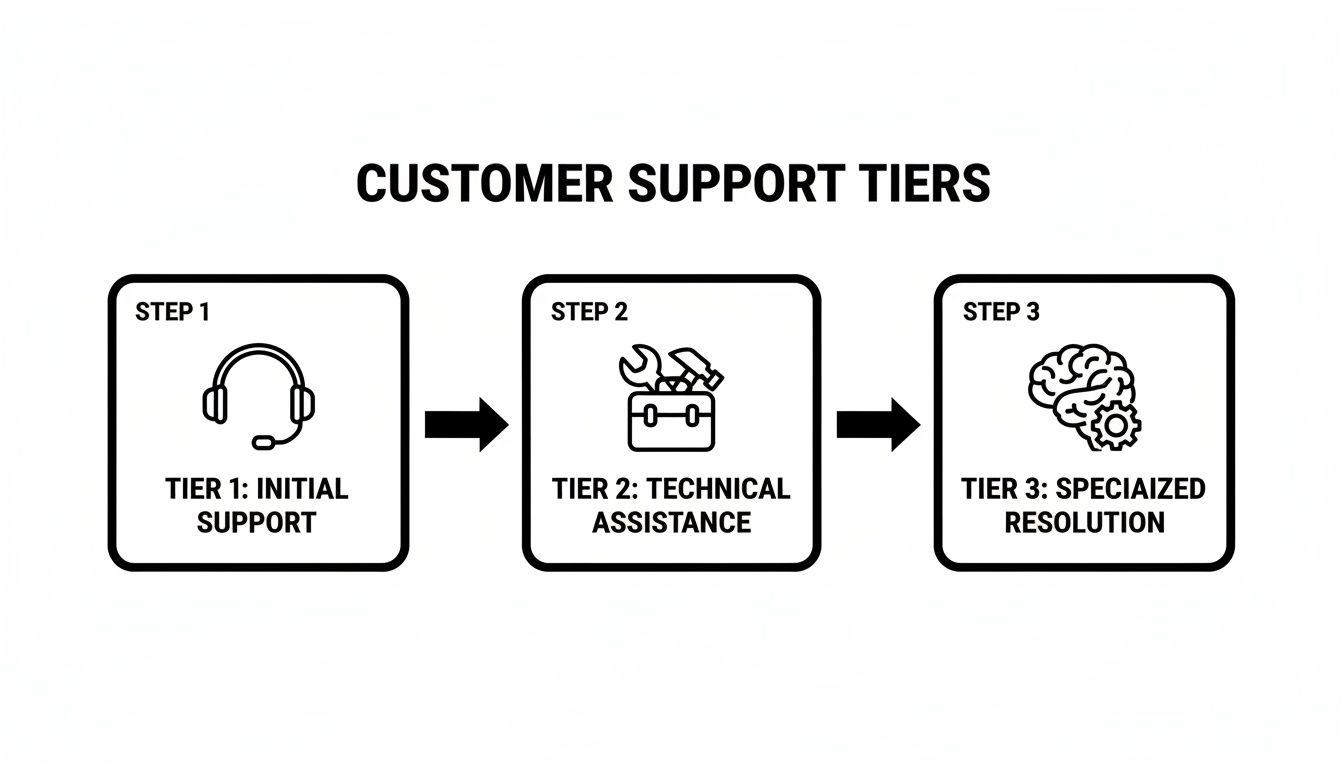
Each tier adds a specific layer of expertise, which is key to solving tougher problems without wasting time.
Core components of an escalation matrix
Your matrix needs to be dead simple and accessible to everyone on the team. Forget about massive, over-engineered spreadsheets that nobody can read. Clarity is king.
Every solid escalation matrix must spell out these four things:
- Issue Type/Category: What kind of problem is this? Get specific. “Billing Dispute,” “Critical Bug Report,” “Feature Request,” or “Security Concern” are good examples.
- Severity Level: How bad is it? Most teams use a P1 to P4 scale, where P1 is a full-blown crisis. A P1 might be a system-wide outage, while a P4 could be a minor typo on your website.
- Ownership/Escalation Path: Who gets the ticket first, and who’s next in line? This column should list the role or team for each tier (e.g., Tier 1 Agent → Tier 2 Specialist → On-Call Engineer).
- Service Level Agreement (SLA): How much time do we have? These are your time-based targets for responding and resolving the issue at every single stage. Honestly, this is the part that matters most for keeping customers happy.
Setting realistic and firm SLAs
Service Level Agreements (SLAs) are the promises you make to customers about how quickly you’ll jump on their problems. You can’t just pull numbers out of thin air. You have to strike a balance between what customers expect and what your team can realistically deliver.
An SLA isn’t just an internal metric; it’s a commitment to your customer. Customers who have their issues resolved quickly are far more likely to remain loyal and even spend more on future purchases.
When you’re defining SLAs, you need to break them down into two distinct goals for each severity level:
- Time to First Response: How long it takes an agent to acknowledge the ticket and start working. This simple step tells the customer, “We heard you.”
- Time to Resolution: The total time it takes to completely solve the problem from start to finish. This is the number customers really care about.
For example, a “Critical Bug Report” (P1) might have a 15-minute response SLA and a 4-hour resolution SLA. On the flip side, a “Minor UI Glitch” (P3) could have a 4-hour response SLA and a 48-hour resolution SLA.
Staying on top of these deadlines is non-negotiable. Using a tool like a support SLA countdown timer can really help your team visualize and hit those targets before they breach.
Bringing the matrix to life with a scenario
Let’s walk through a real-world example to see how the matrix actually works.
Scenario: A high-value customer reports a critical bug. Their entire team is blocked from using a core feature.
- Initial Contact (Tier 1): The Tier 1 agent gets the ticket. They immediately check the matrix, see it’s a “Critical Bug Report” (P1), and know their job is to verify the issue and grab initial logs within 15 minutes.
- Handoff to Tier 2: The agent confirms the bug is reproducible. Just like the matrix says, they escalate to the “Tier 2 Product Specialist” team. The handoff is clean-it includes a quick summary, customer info, and the logs they pulled. The clock for the Tier 2 SLA starts ticking.
- Investigation (Tier 2): The Tier 2 specialist has a 1-hour SLA to dig in. They analyze the logs, trace the problem, and confirm it requires a code-level fix. It’s a real bug.
- Final Escalation (Tier 3): The matrix is clear: confirmed P1 bugs go to the “On-Call Engineering” team. The Tier 2 specialist passes along a detailed report. Now, the engineering team is on the hook with a 3-hour SLA to deploy a hotfix.
Throughout this entire ordeal, the matrix provides a clear, no-nonsense path forward. There’s no confusion, no finger-pointing, and no wasted time. This kind of structured approach means a potential crisis gets handled with the speed and precision it needs, turning a disaster into a moment where you prove how reliable you are.
Using AI automation to get ahead of escalations
Let’s be honest, manual escalation processes are a huge bottleneck. An agent has to read a ticket, realize it’s over their head, and then waste precious minutes figuring out who it belongs to. This whole reactive loop is slow, wide open to human error, and a surefire way to frustrate customers. Smart support teams are ditching these old-school handoffs for intelligent automation.
AI is what makes this shift possible. Instead of waiting for a human to flag a problem, an AI-powered system can analyze incoming tickets the second they arrive. It instantly scans for keywords, gauges customer sentiment, and figures out the real intent behind the message. This means routing decisions happen in seconds, not minutes (or hours).
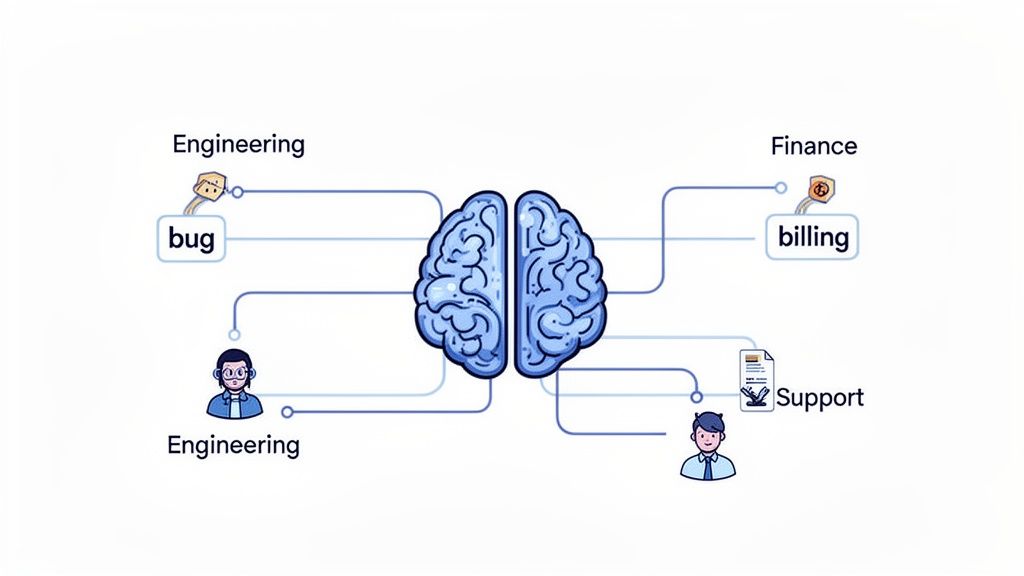
This is how you bridge the gap between clunky manual work and a modern, scalable solution that slashes response times and operational costs. It’s all about getting ahead of the problem before it can blow up.
How AI automates routing and resolution
The real magic of AI in a customer service escalation process is its ability to learn and then act. A platform like Ticketdesk AI doesn’t just blindly follow rigid rules; it learns from your knowledge base, past tickets, and successful resolutions. The system literally gets smarter and more effective with every ticket it sees.
Think about how AI makes an immediate difference in these everyday scenarios:
- Smart Triage: A new ticket comes in with keywords like “invoice,” “charge,” or “refund.” The AI immediately routes it to the Finance team without an agent ever having to touch it.
- Technical Escalations: A customer mentions an “API error” and pastes in a code snippet. The AI instantly recognizes the technical jargon and sends it straight to the Tier 2 engineering queue.
- Sentiment Detection: An AI picks up on the frustrated tone of a long, angry message. It automatically flags the ticket with high negative sentiment and bumps it to the front of the line for a senior agent.
AI isn’t here to replace your expert agents. It’s here to augment them. By handling the repetitive, predictable stuff, AI frees up your team’s brainpower for the complex, high-stakes issues that actually need a human touch.
This automated first pass makes sure every issue lands in the right place from the get-go, cutting out that frustrating back-and-forth that customers despise.
Preventing escalations before they happen
The best escalation is the one that never happens in the first place. AI plays a massive role here, too, by powering self-service and giving agents the tools they need for first-contact resolution.
An intelligent system can learn your documentation inside and out to resolve routine questions all on its own. When a user asks, “How do I reset my password?” the AI can instantly serve up the correct steps from your help center. To see this in action, you can learn more about how to automate ticket responses with AI and see the direct impact it has on ticket volume.
AI can also give live agents a hand by suggesting relevant articles or canned responses as they type. If an agent is tackling a common bug report, the AI can surface internal notes and troubleshooting steps for that specific issue. This empowers your Tier 1 agents to solve more problems on their own, which drives your overall escalation rate down.
The result? A more efficient team and happier customers who get answers fast. This proactive approach completely changes the game for customer support. Instead of constantly putting out fires, your team can focus on delivering great service and building real customer relationships.
How can empowering your team with flawless handoffs?
You can map out the perfect customer service escalation process on a whiteboard, but it’s all theory until your team puts it into practice. Your escalation matrix and fancy tools provide the structure, but it’s the human element-the actual conversation between agents-that determines whether a handoff feels seamless or like a total breakdown to the customer.
Getting this right isn’t a “nice-to-have.” It’s the final, critical step that makes the whole strategy work.
The bedrock of any great handoff is clear, easily accessible documentation. Your internal knowledge base needs to be the single source of truth, spelling out every procedure, contact point, and SLA. When an agent is feeling the pressure from a customer, they can’t be digging through outdated wikis; they need answers, and they need them fast.
Training for real-world scenarios
It’s one thing to read a manual on how to handle an upset customer. It’s another thing entirely to actually face one. This is where practical, scenario-based training is worth its weight in gold.
Role-playing exercises are brilliant for building muscle memory and confidence. You need to simulate the messy, high-stakes situations your team actually deals with.
For instance, have one agent play a frustrated customer whose critical bug report was completely misunderstood by the first agent. The other agent has to practice active listening, summarize the issue correctly, and then execute a perfect handoff to a “Tier 2” specialist. This stuff builds empathy and polishes communication skills in a safe space, before they have to do it live.
Mastering the art of de-escalation
Honestly, the best escalation is the one that never has to happen. Training your agents in solid de-escalation techniques is one of the most effective ways to lower your overall escalation rate. This isn’t about scripts; it’s about teaching core skills:
- Actively Listen: Seriously. Let the customer get it all out without interrupting.
- Empathize Sincerely: Use phrases that show you get it, like, “I can absolutely see why that’s so frustrating.”
- Take Ownership: Ditch the blame game. Focus entirely on the path to a solution.
- Reframe the Conversation: Gently pivot the focus from the problem to the resolution.
When agents feel empowered to solve more problems on their own, they stop being ticket-passers and start being problem-solvers. That’s a huge win for your first-contact resolution rates and team morale.
A study found that 45% of customers will forgive a company after receiving a sincere apology for a mistake. In contrast, only 23% feel the same way if they’re just offered compensation. This shows that real empathy and ownership often matter more than throwing money at a problem.
The perfect handoff checklist
The single biggest reason customers get angry during an escalation is having to repeat themselves. Lost context is the enemy. To kill it for good, you need a standardized handoff procedure. A simple checklist can work wonders here, making sure all the essential info gets passed from one tier to the next.
A flawless handoff means the next agent can jump right in and pick up the conversation exactly where it left off. Here’s a practical checklist your team can start using today.
The Perfect Handoff Checklist
| Checklist Item | Purpose | Example |
|---|---|---|
| Clear Ticket Summary | To provide immediate context without the next person having to read the entire thread. | “Customer’s reporting a P2 bug where the user export function fails for accounts with >500 users.” |
| Troubleshooting Steps Taken | To stop the next agent from repeating steps and wasting everyone’s time. | “Cleared cache, tried incognito mode, and confirmed the issue persists across multiple browsers.” |
| Customer’s Goal | To understand what a successful resolution actually looks like for them. | “They need the user export for a critical board meeting tomorrow morning.” |
| Customer Sentiment | To prepare the next agent for the customer’s emotional state. | “Customer is highly frustrated but cooperative. Needs reassurance and a firm timeline.” |
When you really drill down on these human-centric elements-practical training, de-escalation skills, and standardized procedures-you give your team the tools to handle escalations with confidence and genuine care. This is how you turn a potentially negative experience into a moment that actually builds trust and reinforces customer loyalty.
Your escalation process shouldn’t be a “set it and forget it” document. If it is, you’re flying blind. The best support teams I’ve worked with treat it like a living, breathing system-one that needs constant attention and fine-tuning to actually work. Without data, you’re just guessing.
Data gives you a roadmap. It shines a light on the friction points in your process, letting you shift from constantly putting out fires to proactively making things better. This loop of measuring, analyzing, and refining is what separates the merely good support teams from the truly great ones.
Identifying your core escalation metrics
To get a real feel for how your process is holding up, you need to track the right KPIs. Skip the vanity metrics and zero in on the numbers that tell you the real story about your team’s efficiency and your customers’ happiness.
Start with these fundamentals:
- Escalation Rate: What percentage of your total tickets get escalated? A consistently high rate, especially from your Tier 1 agents, is a massive red flag. It usually points to a knowledge gap or a desperate need for better documentation.
- First Contact Resolution (FCR): This is the gold standard for a reason. When your FCR rate is low, it means customers are having to chase you for a solution. That’s a fast track to frustration and churn.
- Time to Resolution (TTR) by Tier: How long does it actually take to close an escalated ticket? Tracking this for each tier is crucial for spotting bottlenecks where tickets go to die.
A customer complaint is a make-or-break moment. We’ve seen research showing that customers who get their issues sorted out in just 5 minutes are often willing to spend more later on. That just goes to show how much a fast, efficient escalation process is worth.
Analyzing data to uncover root causes
Once you have the numbers, the real detective work starts. You’re looking for patterns and asking one simple question: “Why?” A high escalation rate isn’t just a number on a dashboard; it’s a symptom of a deeper problem.
For example, maybe you dig in and see that 70% of all escalations from Tier 1 are about one specific product feature. That’s not a coincidence. The problem likely isn’t that your agents are lazy; it’s that they don’t have the training or the right KB article to handle that topic with confidence.
This kind of analysis lets you pinpoint exactly where to focus your energy. Maybe you need to spin up a new training session, write a super-detailed guide for the knowledge base, or tweak your escalation matrix so those specific issues get routed to the right person from the get-go.
Creating feedback loops for human insights
Data tells you what is happening. Your agents can tell you why.
Numbers alone can’t capture the frustration of a clunky handoff process or the nuance of a really tricky customer interaction. That’s why you absolutely have to build regular feedback loops with your team.
I recommend setting up quick, monthly check-ins with agents from every tier. Ask them direct questions. “What’s the most annoying part of passing a ticket to the next tier?” or “What’s one tool or article that would help you solve more issues yourself?” Their insights from the front lines are pure gold.
Got questions? We’ve got answers
When you’re in the trenches designing a new escalation process, a lot of the same questions tend to pop up. Here are some of the most common ones I hear from support managers, along with my straight-up answers.
What’s the magic number for support tiers?
Spoiler alert: there isn’t one. But if you’re looking for a solid, proven starting point, a three-tier system is almost always the way to go. It brings clarity without overcomplicating things.
Here’s how it usually breaks down:
- Tier 1: Your frontline crew. They catch the initial contact and knock out the common, high-volume problems.
- Tier 2: The specialists. These are the folks who dig into more technical or complex issues that Tier 1 can’t solve.
- Tier 3: The heavy hitters. Think subject matter experts or engineers who tackle the gnarliest bugs and system-level problems.
The real goal here is to keep your structure as lean as possible. You want a clear path to an expert for every single problem, but adding too many layers just creates confusion and slows everything down.
How can I stop agents from escalating everything?
If you see agents escalating too quickly, it’s rarely because they’re lazy. It’s almost always a sign that they feel they lack the confidence, knowledge, or tools to solve the problem themselves.
The fix? Empower your frontline team.
Give them a rock-solid, easily searchable knowledge base. Run regular training sessions on your product and common customer sticking points. Most importantly, build a culture where they feel safe to take a swing at solving a problem before passing it up the chain.
Clearly define what absolutely must be escalated. For everything else, give them the autonomy to handle it.
The real power of bringing AI into your escalation workflow is how it crushes manual work and eliminates human error. It can read a ticket, understand the urgency or keywords, and route it to the right person instantly-meaning it never even hits the wrong queue.
And don’t forget, tools like Ticketdesk AI can also resolve all those repetitive, low-level questions on their own, stopping them from ever becoming escalations in the first place. This frees up your human agents to focus their brainpower on the high-stakes issues that genuinely need their expertise.

Ready to get started?
Join hundreds of teams using Ticketdesk AI to deliver exceptional customer support.