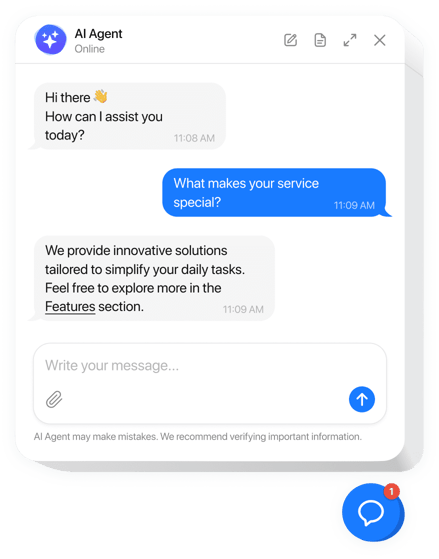
How to Automate Customer Service with Proven Workflows
When we talk about automating customer service, we’re really talking about using technology like AI to handle all those routine, predictable support tasks. This isn’t about replacing people; it’s about freeing up your human agents to tackle the more complex problems where they can really shine.
This whole approach is more than just a way to trim the budget. It’s a strategic move to improve efficiency and scale your support as you grow, but without letting quality slide. The payoff? Customers get faster answers, and your support team gets to do more meaningful, high-impact work.
Why Smart Automation Is a Growth Strategy, Not Just a Cost Cutter

For years, the main pitch for customer service automation was simple: save money. While cost reduction is definitely a perk, looking at it only through that lens means you’re missing the bigger picture. Smart automation is a powerful growth engine that directly builds customer loyalty and helps you expand your business.
Just think about your most skilled agents. Are they spending their days resetting passwords and checking on order statuses? These repetitive tasks are necessary, of course, but they don’t tap into their deep product knowledge or expert problem-solving skills. This is where automation really changes the game.
Unlocking Your Team’s True Potential
By handing off the high-volume, low-complexity questions to an AI system, you empower your human experts to focus on what they do best. They can now dedicate their time to handling the nuanced, high-stakes issues that automation simply can’t. These are the conversations that prevent churn, build real trust, and can turn a frustrated user into a loyal advocate.
Let’s look at a few common scenarios where automation becomes a strategic tool:
- SaaS Onboarding: An AI agent can instantly answer all the basic setup questions, which lets your human agents provide personalized, white-glove guidance to your high-value enterprise clients.
- E-commerce Peak Season: During a Black Friday rush, automation can handle the flood of “where is my order?” tickets. This ensures your team has the bandwidth to manage complex returns or damaged item reports without getting totally overwhelmed.
- 24/7 Global Support: Automation offers immediate, round-the-clock help to customers in different time zones, creating a consistent and reliable experience for a global customer base.
By handling the predictable, automation allows your team to deliver the exceptional. It transforms the support function from a reactive cost center into a proactive, relationship-building asset.
This strategic shift is all about creating a hybrid model where technology and human expertise work in tandem. The AI acts as the first line of defense, resolving routine stuff with speed and accuracy. But when a query requires empathy, critical thinking, or a truly custom solution, it’s seamlessly escalated to a human agent who already has all the context they need.
The Financial Impact Beyond Savings
This hybrid approach also completely reshapes the financial side of customer support. The efficiency gains are massive. Industry analyses show that AI can lower contact center operating costs by 20-30% just by shifting repetitive work to automated channels.
These savings come from very real effects, like ticket deflection, where virtual assistants can handle up to 70% of simple inquiries on their own. We also see a 30-68% drop in the need for peak staffing. You can read more about the benefits of customer service automation and its financial impact.
Ultimately, when you automate customer service intelligently, you’re not just trimming expenses. You’re building a scalable support operation that can grow right alongside your business. You’re also improving agent satisfaction by making their work more engaging and delivering the kind of consistently great service that fosters long-term loyalty. This foundation is what sets the stage for sustainable growth, proving that the smartest investment in technology is one that empowers your people.
Auditing Your Support and Identifying Automation Opportunities
Before you even think about shopping for AI tools, the first-and most critical-step is to take a hard look at your current support operations. Jumping into automation without knowing what you need to fix is a recipe for frustration. You’ll spend time and money but won’t solve any real problems.
A proper audit is your roadmap. It shows you exactly where you can automate customer service to get the biggest bang for your buck.
This all starts with data. Your helpdesk isn’t just a queue of customer issues; it’s a goldmine of insights telling you exactly what’s slowing down your team and annoying your customers.
Analyzing Ticket Volume and Content
First things first, dive into your ticket data from the last 90 days. Don’t just glance at the total number. You need to get granular and categorize everything. What are the top reasons people are reaching out?
You’ll almost certainly find that a handful of issues are responsible for most of the noise. It’s the classic 80/20 rule-80% of your tickets probably come from just 20% of topics. These are your prime candidates for automation.
You’ll see the usual suspects pop up again and again:
- Password Resets: A textbook example of a high-volume, low-complexity task that’s perfect for a self-service bot.
- Order Status Questions: Simple “Where’s my stuff?” queries can be answered instantly by an AI tied into your shipping or order management system.
- Basic Billing Inquiries: Questions about due dates, payment methods, or plan details are repetitive and easily automated.
Once you’ve identified these patterns, you can do some simple math to see the potential impact. Let’s say a password reset takes an agent three minutes to handle, and you get 500 of them a month. Automating just that one task frees up 25 hours of agent time-every single month. That’s time your team can now spend on tricky, high-value customer problems.
Evaluating Your Knowledge Base Readiness
Think of your existing documentation as the fuel for your AI engine. An AI agent is only as smart as the information you feed it. So before you can automate customer service effectively, you need to make sure your knowledge base is up to the task.
If your help center is a mess of disorganized, outdated, or incomplete articles, your AI will spit out junk answers. That only leads to confused customers and more work for your team.
Your audit needs to check if your help docs, FAQs, and internal guides are:
- Comprehensive: Do you have articles covering the most common questions you just uncovered in your ticket analysis?
- Clear and Concise: Is the language simple and free of jargon? Could a brand-new customer (and an AI) understand it?
- Up-to-Date: When was the last time you reviewed key articles? Do they reflect your latest product features or policies?
If your AI doesn’t have a reliable source of truth, it’s guaranteed to fail. A clean, well-maintained knowledge base isn’t just a nice-to-have; it’s the absolute foundation for successful support automation.
If you find gaps, your first job is to create or update that content. The great thing is, this work pays off immediately. It doesn’t just prepare you for AI; it also improves your existing self-service options and gives your human agents a better resource to pull from.
Here’s a simple checklist to walk you through this process and see where you stand.
Automation Readiness Checklist
Use this checklist to get a clear picture of your team’s readiness. Be honest about where you are today-it will help you build a much more effective plan for tomorrow.
| Area of Assessment | Criteria for ‘Ready’ | Action Items if ‘Not Ready’ |
|---|---|---|
| Ticket Data & Analytics | We can easily categorize tickets by topic and track volume for each. | Implement a tagging system in your helpdesk; export and analyze data from the last 3-6 months. |
| Repetitive Task Identification | We have identified our top 3-5 most frequent, low-complexity ticket types. | Perform a ticket audit to find patterns. Survey agents on which tasks are the most repetitive. |
| Knowledge Base Health | Our help docs are up-to-date, comprehensive, and easy to understand. | Schedule a content audit. Assign owners to key articles and create a process for regular reviews. |
| Existing Self-Service Usage | Customers actively use our current help center or FAQ page. | Promote the knowledge base more actively. Add links to relevant articles in agent email signatures. |
| Team Buy-In & Training | The support team understands the goals of automation and is open to new tools. | Hold a team meeting to discuss how automation will help them focus on more engaging work, not replace them. |
Running through this checklist gives you an actionable, data-backed plan. You’ll know exactly which tasks to target first, setting yourself up for quick wins that build momentum and prove the value of your project. This is how you automate customer service the right way.
Choosing the Right AI Helpdesk Platform
Once you’ve mapped out your automation goals, the next big step is finding the right tech to make it all happen. The market is flooded with options, and picking the perfect AI helpdesk platform can feel overwhelming. But if you focus on a few core capabilities, you can cut through the noise and find a tool that actually helps your team.
The goal here isn’t just to buy a platform; it’s to find one that fits into your existing workflows like a glove and starts delivering value from day one. Look for solutions that are practical, not just packed with flashy features you’ll never use.
Core Capabilities to Look For
When you automate customer service, the platform’s features can make or break your success. Forget the long, jargon-filled lists and focus on what directly impacts your agents’ and customers’ experience.
These are the non-negotiables for any modern AI helpdesk:
- Seamless CRM and Systems Integration: Your helpdesk can’t be an island. It needs to plug directly into your CRM, order management systems, and other business tools to pull in the customer context needed for every single interaction.
- Automated Ticket Tagging and Routing: The platform should be smart enough to read incoming tickets, automatically tag them (like “billing” or “bug report”), and send them to the right team without anyone lifting a finger.
- AI-Powered Reply Suggestions: To really speed things up, look for tools that suggest relevant answers or even complete sentences drawn from your knowledge base. This helps agents fly through tickets while keeping your tone and accuracy on point.
A platform that nails these fundamentals, like Ticketdesk AI, gives you a solid foundation for building an efficient support operation that can actually scale. The right tool should feel like a natural extension of your team, not another clunky piece of software they have to fight with.
The Power of Your Knowledge Sources
An AI helpdesk is only as smart as the information you feed it. That’s why the platform you choose must make it dead simple to connect and train the AI on your unique business knowledge. Honestly, this is the most critical part of the whole setup-it’s what ensures you get accurate, helpful automated responses.
Your system should be able to learn from all sorts of sources:
- User guides and product manuals
- Public-facing FAQs and help center articles
- Internal wikis and process documents
- Even your technical API documentation for those trickier questions
How easily you can connect these sources is a huge deal. The best platforms can slash your setup time from weeks down to just a few minutes. When your AI has direct access to your company’s “brain,” it can handle a much wider range of questions correctly right out of the gate. Check out our detailed guide on how to properly train an AI agent to see this process in action.
The real magic of an AI helpdesk isn’t just the algorithm; it’s how effectively it can absorb, understand, and apply your specific knowledge to solve your customers’ specific problems.
Evaluating Platforms and Making a Choice
With a clear idea of what you need, you can start looking at different vendors. To help navigate all the options out there, you can explore these top AI chatbot for customer service tools. As you review them, think about the total experience, from implementation to daily use.
This whole space is moving incredibly fast. The AI customer service market was pegged at $13.01 billion in 2024 and is expected to rocket to over $83 billion by 2033. This boom is driven by companies realizing just how much strategic value automation offers.
Interestingly, while surveys show up to 80% of contact centers are using some form of AI, only about 25% have it fully baked into their daily operations. That’s a huge opportunity for teams that pick the right, easy-to-implement platform to get ahead.
Ultimately, choosing the right platform is about finding a partner that helps you automate customer service quickly and effectively. Prioritize tools that offer a fast setup, deep integration capabilities, and a clear path to a strong return on your investment.
Designing Smart Workflows and Escalation Paths
Great automation isn’t about replacing your team; it’s about making them more effective. Once you’ve picked a tool, the real work begins: designing the intelligent workflows that bring your strategy to life. This is where you map out the rules and pathways that get every customer query the right kind of attention, from the right resource, at the right time.
The goal is to build a system that feels totally seamless to the customer. They should never feel like they’re being bounced around. Instead, they should feel like you instantly understood their problem and are already on top of it.
The Blueprint for Intelligent Routing
At its core, intelligent routing is all about speed and precision. As soon as a ticket lands, the system needs to understand its intent and send it to the exact person or team best equipped to handle it. This simple function can eliminate hours of manual triage and slash your first response times.
The process involves creating specific rules based on keywords, customer sentiment, or user data. Think of it as creating a digital sorting hat for your support inquiries.
For example, your routing rules could look something like this:
- Billing Questions: Any ticket with keywords like “invoice,” “subscription,” “refund,” or “payment failed” gets assigned to the Finance team’s queue. No detours.
- Technical Bugs: If a ticket mentions an “error message,” “won’t load,” or a specific feature that’s malfunctioning, it goes straight to the Engineering support queue.
- Feature Ideas: Queries with phrases like “it would be great if” or “suggestion for the app” are routed directly to the Product team’s feedback board.
By setting up these pathways, you ensure experts are working on the problems they’re meant to solve. You can dive deeper into this by understanding automated ticket routing in practice. This direct line from problem to solution is a hallmark of an effective automation plan.
Building Your Human-in-the-Loop Safety Net
Let’s be real: no matter how smart your AI is, some situations just need a human. Acknowledging this is crucial for building trust with both your customers and your own team. This is where a human-in-the-loop (HITL) system comes in-it’s your automation safety net.
An HITL workflow defines the exact moments when a conversation should be passed from the AI to a person. These triggers are your system’s way of raising its hand and saying, “I need some help here.”
The best automation knows its own limits. A well-designed escalation path ensures that technology enhances the customer experience, rather than becoming a frustrating barrier to getting real help.
This flow is all about integrating your tools, routing tickets intelligently, and training the AI to handle these workflows smoothly.
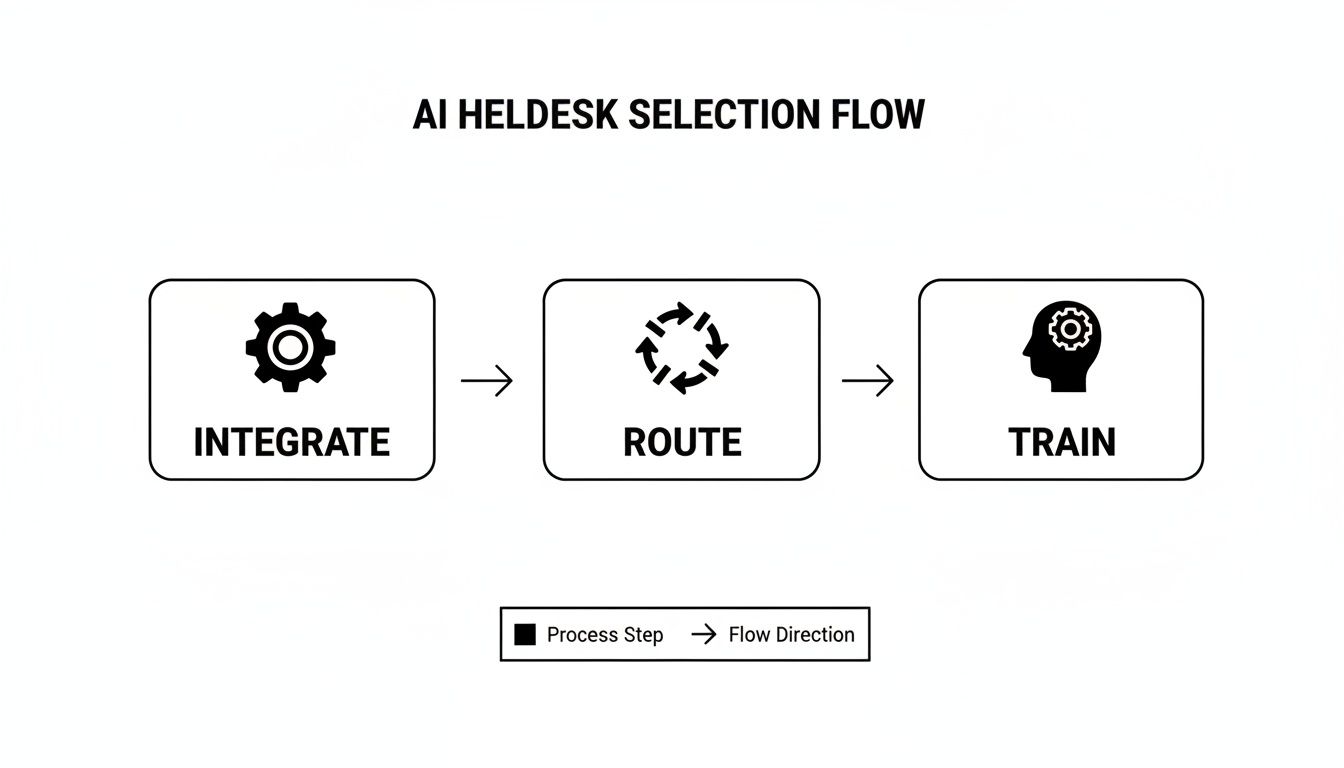
This process isn’t just a single action. It’s a connected system where routing rules and AI training work together. To make it truly effective, you have to train a chatbot with your own data so its responses are accurate and make sense within the workflows you’ve designed.
Defining Clear Escalation Triggers
Your escalation triggers need to be specific and proactive. You want to hand off the conversation before the customer hits their breaking point.
To help you get started, here are some practical examples of rules that automatically escalate a ticket from an AI to a human agent.
Sample Escalation Triggers and Routing Rules
| Ticket Category/Keyword | Initial Handler | Escalation Trigger | Destination Team/Agent |
|---|---|---|---|
| "Cancel Account" | AI Helpdesk | Keyword match on “cancel” or “delete account” | Customer Retention Specialist |
| Technical Support | AI Helpdesk | 2 failed resolution attempts by AI | Tier 2 Technical Support |
| Negative Feedback | AI Helpdesk | Sentiment analysis detects high frustration | Support Team Lead |
| "Speak to a Manager" | AI Helpdesk | Explicit request for human escalation | Senior Support Agent |
| "Legal Notice" | AI Helpdesk | Keyword match on “legal,” “lawsuit,” or “subpoena” | Legal Department Queue |
These rules create a safety net, ensuring that while the AI handles the bulk of queries, your customers always have a clear path to a human expert when they need one. This hybrid model-combining the efficiency of machines with the empathy and critical thinking of people-is the foundation of a modern support experience.
How to Measure Performance and Continuously Improve
Getting your AI helpdesk up and running isn’t the finish line-it’s just the starting block. The real wins come from the ongoing cycle of tracking performance, digging into the data, and making smart, targeted tweaks. If you skip this part, even the best-built automation will eventually start to feel a bit stale and less effective.
Think of your AI platform as a new team member that needs regular coaching. To do that, you need to know what a good job looks like. Your AI helpdesk’s analytics dashboard is where you’ll spend most of your time, giving you a live look at how your system is performing and where it might be stumbling.
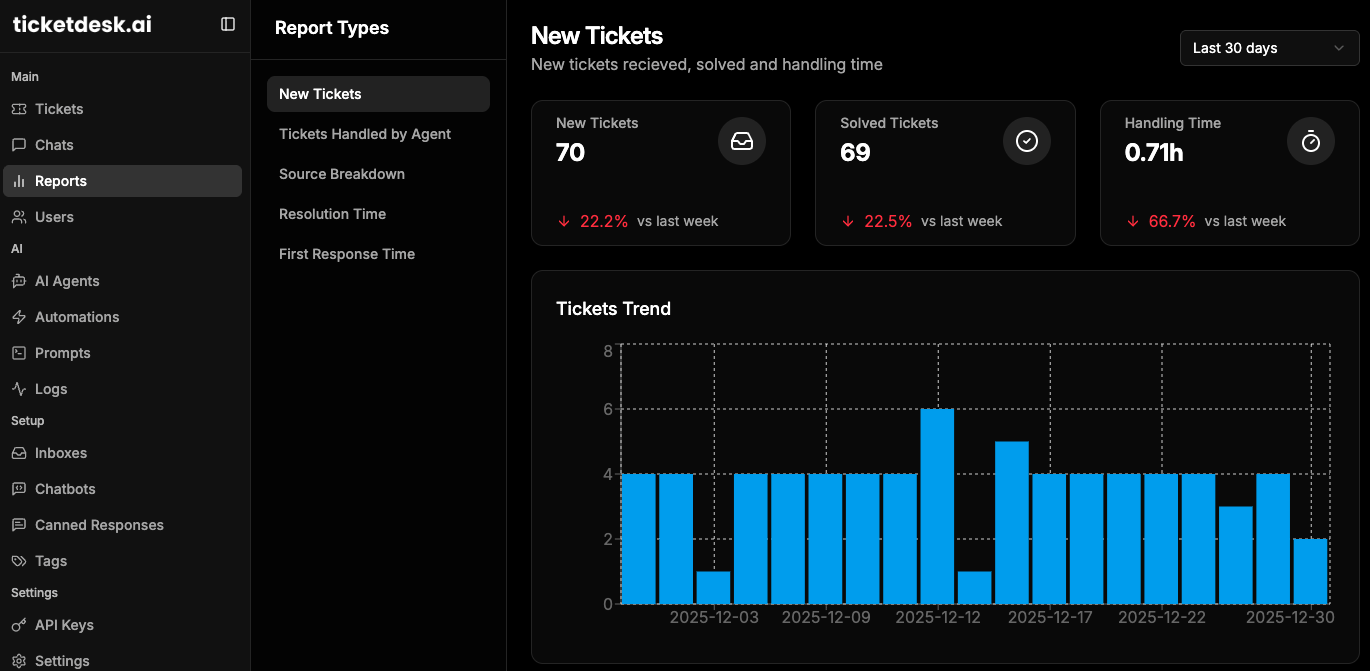
Key Metrics to Monitor in Your Dashboard
Your dashboard is packed with data, but you don’t need to track everything. A few key performance indicators (KPIs) will tell you most of the story. Focusing on these helps you measure the real impact when you automate customer service and points you toward the most important improvements.
Here are the core metrics I always keep an eye on:
- AI Resolution Rate: What percentage of conversations does the AI handle completely on its own, without a human ever touching it? This is your North Star for automation effectiveness.
- Ticket Deflection Rate: How many questions get answered by the AI before they even have a chance to become a ticket in an agent’s queue? A high deflection rate is a clear sign you’re cutting down on the manual workload.
- Escalation Rate: On the flip side, how often does the AI have to pass a conversation to a human? Just as important is why it’s escalating-this is where you find your knowledge gaps.
- Impact on Agent Workload: Are your human agents handling fewer of those repetitive, easy-to-answer tickets? Is their handle time going down on complex issues because the AI is gathering info upfront?
Your data tells a story about what your customers need and how well your automation is delivering. The goal isn’t just to watch numbers go up or down but to understand the ‘why’ behind the trends.
A low AI resolution rate isn’t a failure; it’s a signpost. It tells you exactly where to focus your training efforts next. This is how you build a system that genuinely learns and gets better over time.
Turning Data into Actionable Improvements
Data without action is just noise. The support teams that get the best results treat performance monitoring as an active, ongoing process of discovery and refinement. It’s this iterative loop that separates a decent AI setup from a truly great one.
You also have to keep an eye on how customer expectations are shifting. As people get more used to AI, their behavior changes. Many CX leaders are now forecasting that AI will handle 60-80% of common support issues within the next couple of years. This is happening because about half of all consumers actually prefer a bot for an instant answer, though most still want a human for the tricky stuff. This reinforces the need for a smart escalation path.
Here’s a simple, practical way to turn your analytics into real improvements:
- Analyze Escalated Tickets: Make this a weekly ritual. Pull a report of all the tickets your AI couldn’t handle. Do you see a pattern? These tickets are a goldmine, showing you exactly what to add or clarify in your knowledge base.
- Review Bot Conversations: Spend some time reading the actual transcripts of both successful and failed AI interactions. You’ll quickly spot opportunities to rephrase a bot’s response for better clarity or adjust a workflow trigger to be more intuitive.
- Get Feedback from Your Agents: Your support agents are on the front lines every day. They know better than anyone where the system is a huge help and where it’s causing friction. Set up a simple feedback channel so they can easily flag issues or suggest improvements.
This loop-monitor, analyze, improve-is what guarantees your automation delivers value for the long haul. It helps you keep up with your customers and constantly sharpen your processes.
By regularly checking your performance, you also get a much clearer picture of your return on investment. To see how these efficiency gains translate into real savings, you can plug your numbers into our help desk ROI calculator and quantify the impact.
Common Questions About Automating Customer Service
When you start seriously thinking about bringing automation into your support workflow, a lot of practical questions pop up. And they should. This is more than just a tech upgrade; it’s a shift in how your team works and how customers see your brand. Let’s walk through some of the most common questions support managers have when they’re on the verge of bringing in automation.
Will Automating Customer Service Replace My Human Agents?
This is almost always the first question, and it’s a big one. But the reality is that modern automation is built to augment your team, not replace it. The whole idea is to intelligently handle the repetitive, high-volume tasks that burn out your agents, freeing them up to focus on the complex problems where a human touch is non-negotiable.
Instead of answering the same password reset query all day, your team can finally dig into tricky billing issues, step in to prevent a high-value customer from churning, or build genuine relationships. In practice, automation actually elevates their role from a first-line responder to a specialized problem-solver. It makes their work a lot more engaging and valuable.
Think of it like this: your best agents become the specialists, while the AI handles the initial triage. This hybrid model lets you scale support without losing the personal touch that makes for great service.
How Much Technical Skill Is Needed to Set Up an AI Helpdesk?
You’d be surprised. You really don’t need a team of developers to get an AI helpdesk off the ground. Modern platforms like Ticketdesk AI are designed with no-code or low-code interfaces, putting the power to build and tweak workflows directly in the hands of support managers-not just engineers.
Getting started usually involves a few pretty straightforward steps:
- Connecting Your Knowledge Sources: This is often as simple as pointing the system to your existing help center, internal FAQs, and user guides. The AI reads all of it to learn how to answer questions accurately.
- Configuring Basic Rules: Using a visual editor, you can set up simple “if-then” rules for how tickets get tagged and routed, all without writing a single line of code.
Sure, you can get more advanced with APIs and deeper integrations, but the core features for automated tagging, routing, and replies are built to be user-friendly. This means you can start seeing a real impact in minutes, not weeks, which makes the whole project feel a lot less intimidating.
The most effective AI helpdesk platforms are built for the people who actually use them every day: support leaders and their teams. Technical complexity should never be a barrier to improving your customer experience.
This accessibility is key. It lets you be nimble, making small adjustments to your workflows on the fly as you see what’s working best for your customers and what’s helping your team the most.
What Happens When the AI Can’t Answer a Question?
No AI is perfect, and a smart automation strategy has a plan for that from day one. This is where a well-designed “human-in-the-loop” workflow becomes absolutely critical. A solid system needs clear, predefined escalation paths for when the AI gets stuck.
If the AI can’t solve an issue after a couple of tries, or if it picks up on a customer’s frustration, the system should automatically and seamlessly hand the entire conversation over to a human agent. The key here is context. The agent gets the full chat history, so the customer never has to repeat themselves-one of the most frustrating experiences in support.
These escalated tickets aren’t failures; they’re goldmines for improvement. Each one shines a light on a potential gap in your knowledge base or a weak spot in an automated workflow. By reviewing these escalations regularly, you can pinpoint exactly where to make your system smarter over time.
How Do We Actually Measure the ROI of Automation?
Measuring the return on your automation investment is a mix of hard numbers and some equally important, “softer” metrics. A good AI helpdesk will give you a real-time analytics dashboard that makes it easy to track the KPIs that truly matter.
Quantitative Metrics to Track:
- Ticket Deflection Rate: How many issues did the AI solve completely, so an agent never had to touch them?
- Reduction in First Response Time (FRT): How much faster are customers getting that first reply now that automation is handling the initial contact?
- Decrease in Cost Per Ticket: As your team gets more efficient, the cost to resolve each ticket should drop.
- Agent Productivity Gains: Are agents handling more complex tickets per day now that the simple stuff is out of their queue?
Qualitative Metrics to Monitor:
- Customer Satisfaction (CSAT): Are your satisfaction scores holding steady or, even better, improving?
- Net Promoter Score (NPS): Is the improved speed and efficiency turning customers into bigger fans of your brand?
By looking at these metrics together, you get a full picture of the value you’re creating. It allows you to clearly show how you automate customer service not just to cut costs, but to build a more efficient, responsive, and effective support operation.