Email Header Parser
Analyze email headers to troubleshoot delivery issues, verify authentication, and investigate spam problems for better customer support.
Paste email headers to analyze routing and authentication
How to Get Email Headers
Gmail
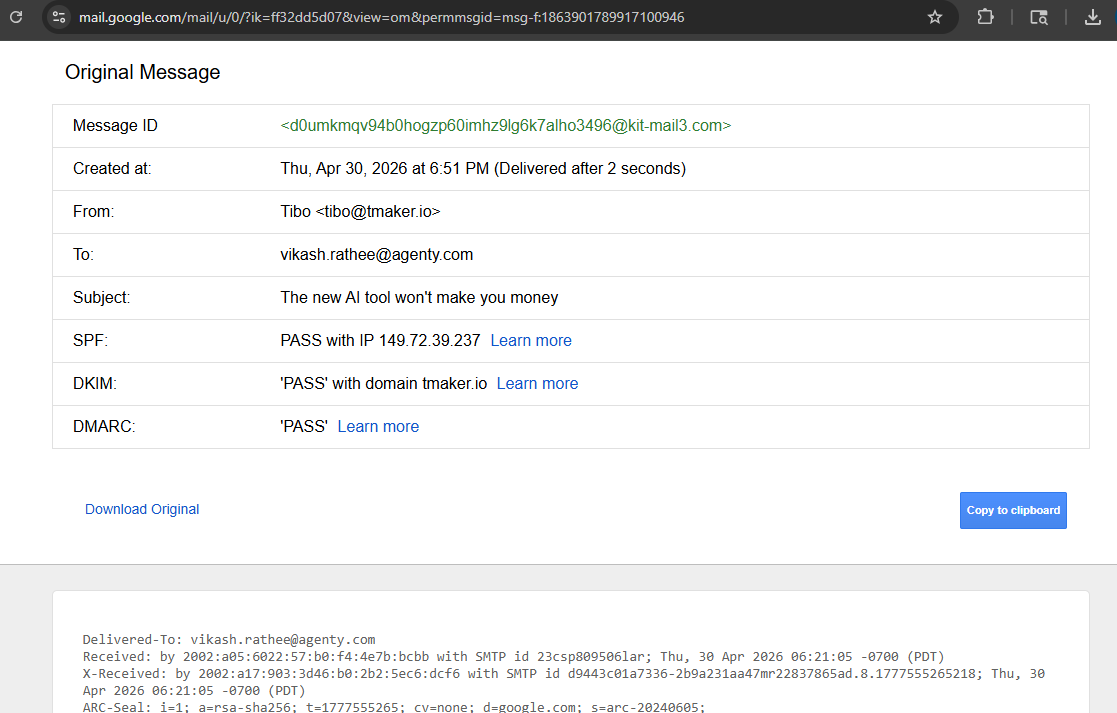
Open email → Three dots menu → "Show original" → Copy headers
Outlook
Open email → File → Properties → Internet headers section
Apple Mail
Open email → View → Message → Raw Source
What information can I extract from email headers?
Follow these steps to find the header in Gmail: Open email > Three dots menu > Show original > Copy headers
 If you needs to find IP Location - Use our IP geolocation tool to analyze server locations.
How can this help with customer support?
Support teams use header analysis to troubleshoot email delivery problems, verify sender authenticity, investigate spam complaints, and understand why emails aren't reaching customers. It's essential for diagnosing email-related support tickets.
You can also analyze the email header to identify which AI agent sent the email, along with details like the account ID and routing information. Learn more about how emails are processed by the AI agent.
Is it safe to use this email header analyzer tool?
This means you can safely parse email headers, perform an email header lookup, or check email headers without exposing sensitive information.