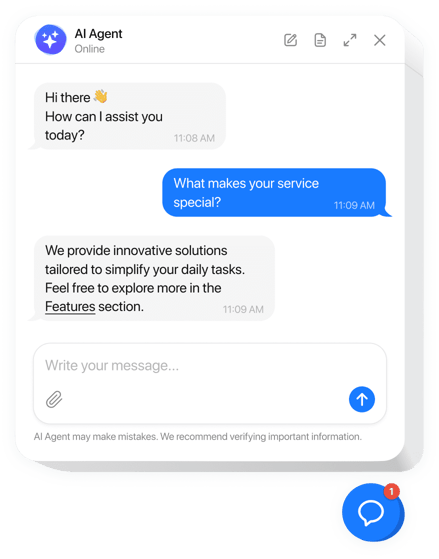
When we talk about AI in customer service, we’re talking about using smart technologies like machine learning and natural language processing to deliver instant, automated support.
For customers, this means getting answers right away, any time of day. For your team, it means they can stop handling repetitive questions and start focusing on the tricky problems that actually need their expertise. It’s a huge shift from old-school support queues to smart, on-demand help.
The New Reality of Customer Support
Let’s imagine: it’s 2 AM, and a customer hits an error on your website. With a traditional support setup, they’d shoot off an email and wait, their frustration building by the hour. That lag time is a major crack in the customer experience and frankly, it’s one that businesses can’t afford anymore.
Now, imagine that same scenario, but with AI. The customer opens a chat window, types out their problem and gets a clear, step-by-step fix in seconds. This is the new standard of instant help that AI in customer service is setting.
Beyond Basic Chatbots
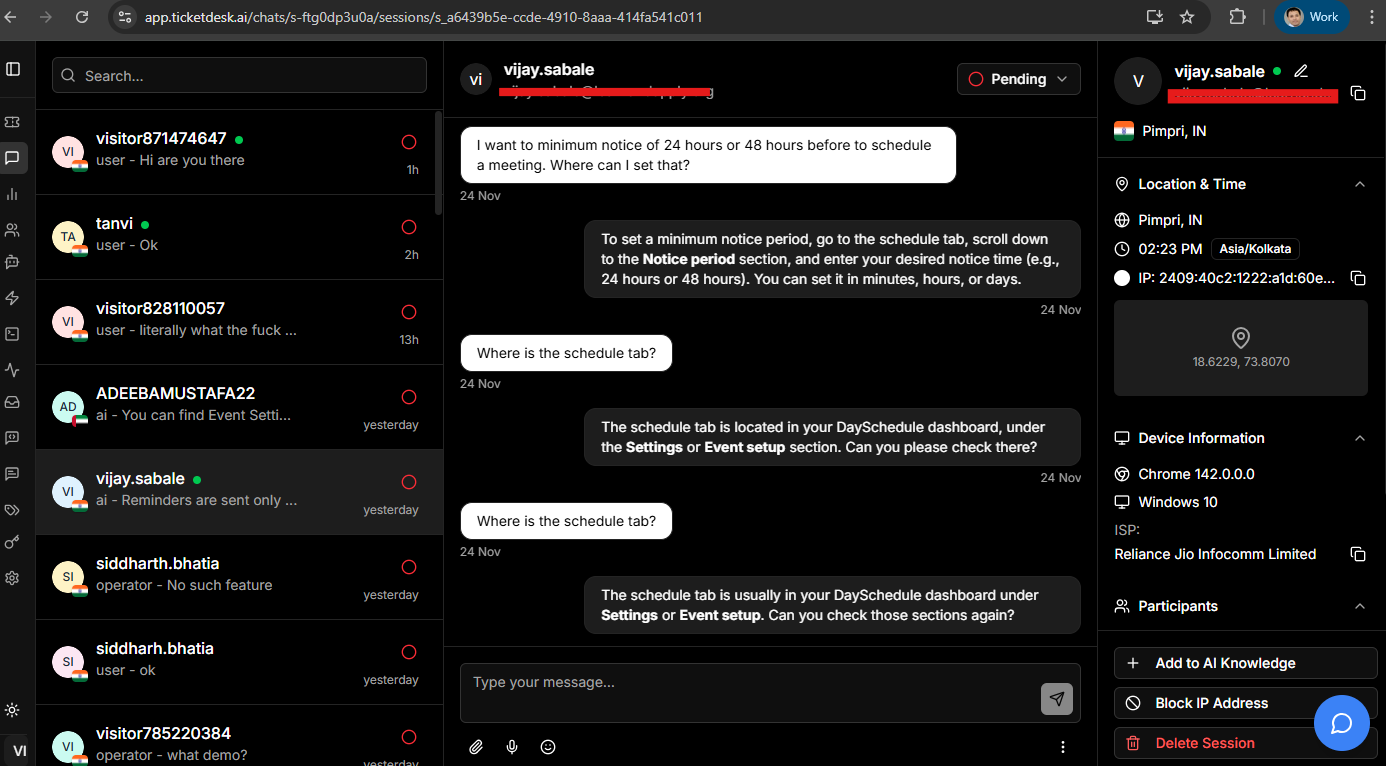
It’s easy to dismiss AI as just another chatbot, but that’s barely scratching the surface. What we’re really looking at is a whole ecosystem designed to make support operations smarter and faster. This isn’t just about spitting out pre-written answers; it’s about understanding what a customer really means, anticipating their next question, and getting better with every single conversation. The result is support that feels less like a script and more like a genuinely helpful interaction.
This isn’t some far-off future, either. It’s happening right now. By 2025, AI is on track to handle a massive 95% of all customer interactions. This change is being pushed by customers who demand speed. In fact, 51% of consumers already prefer getting quick help from a bot over waiting for a human agent because the answers come in seconds. If you want to dig into the numbers, Desk365.io has some great customer service statistics
The goal here isn’t to replace humans. It’s to empower them. By automating the simple, repetitive stuff, AI frees up your agents to do what they do best: build relationships, solve complex issues and create great experiences for your customers.
A Partnership Between Humans and AI
At the end of the day, the strongest support teams are the ones that blend AI with a human touch. This hybrid approach lets you handle a huge volume of requests efficiently without losing that crucial personal connection. The AI takes care of speed and scale, while your agents provide the empathy and nuanced thinking needed for the really tough situations.
This guide will take you past the buzzwords and give you a real roadmap. We’ll break down how the technology works, show you the real-world benefits, and walk you through how to implement it to make your own support operations better.
To really get what makes AI in customer service tick, we need to pop the hood and look at the technologies actually doing the work. Don’t think of these as scary, complex terms. Instead, imagine a small, specialized team where each member has a unique and vital job. Let’s break down who these key players are.
Machine Learning: The Constant Learner
At the core of the team is Machine Learning (ML). Think of ML as that incredibly sharp new hire who learns from every single customer interaction. It pores over past support tickets, chat logs, and successful resolutions to spot patterns. Over time, it starts to figure out which solutions work best for which problems, kind of like how a seasoned agent develops a sixth sense.
This non-stop learning is what lets the AI anticipate customer needs, correctly categorize incoming tickets, and even whisper the most effective replies to human agents. It’s the engine that ensures your AI support gets smarter and more effective every single day.
Natural Language Processing: The Expert Communicator
Next up is Natural Language Processing (NLP). NLP is the team’s expert communicator-the one who bridges the gap between how humans talk and how machines understand. Its main job is to figure out what customers really mean, not just the literal words they’re typing.
This is the tech that allows an AI to understand intent, context, and even the mood of a customer. For instance, NLP is what helps an AI tell the difference between a frustrated customer sarcastically saying “This is unbelievable!” and a thrilled customer saying the exact same thing. It’s what empowers a chatbot to understand a vague question and ask the right follow-up questions to get to the heart of the issue.
To pull this off, NLP uses a few key tricks:
- Sentiment Analysis: Figures out the emotional vibe of a message (positive, negative, neutral) to help prioritize unhappy or urgent customers.
- Intent Recognition: Pinpoints the customer’s actual goal, like “reset my password,” “where is my order?” or “I need a refund.”
- Language Detection: Instantly knows what language a customer is using so it can respond in their native tongue.
Without NLP, an AI is just a glorified script-follower. With it, the AI becomes a true conversational partner.
“AI can help businesses provide warm, familiar, and human-like service interactions that build loyalty.” This really hits the nail on the head. Tech like NLP is what moves AI from robotic replies to creating real connections.
Generative AI: The Creative Writer
The final player-and the one getting all the attention lately-is Generative AI. If ML is the learner and NLP is the listener, then Generative AI is the team’s creative writer. This is the tech that actually crafts the personalized, empathetic, and context-aware responses that feel so human.
Instead of just yanking an answer from a pre-written list, Generative AI builds new sentences and paragraphs from scratch, tailored perfectly for that specific conversation. It can whip up a quick summary of a long ticket history for an agent, draft a friendly follow-up email, or create a step-by-step troubleshooting guide right on the spot. This is what gives AI the flexibility to handle a much wider range of issues.
Platforms like Ticketdesk AI are built to bring all these technologies together seamlessly. The platform uses ML to learn from your help docs, NLP to understand exactly what a customer is asking, and Generative AI to write a clear, accurate answer.
Here’s a simple table to see how these pieces fit together.
Core AI Technologies in Customer Service Explained
| AI Technology | Primary Function | Example in Action |
|---|---|---|
| Machine Learning (ML) | Learns from data to get better over time. | An AI system sifts through thousands of resolved tickets and learns how to automatically tag new ones as “billing issues.” |
| Natural Language Processing (NLP) | Understands and interprets human language. | A chatbot detects sarcasm in a customer’s comment about a long wait time and immediately flags the chat for a human agent. |
| Generative AI | Creates new, human-like content and responses. | An AI tool instantly drafts a personalized apology email to a customer, summarizing their issue and confirming their refund is on the way. |
When you put these three technologies together, you get a powerful trio. They create a system that doesn’t just respond-it understands, learns, and communicates. That’s the secret to building the kind of seamless support experience that today’s customers have come to expect.
The Business Case for AI-Powered Customer Service
Okay, so we’ve talked about the tech. But what does AI in customer service actually do for your business? What’s the real-world impact? It all boils down to three game-changing benefits: running a much more efficient operation, delivering more accurate support, and, of course, saving a significant amount of money.
These aren’t just nice-to-haves. They’re fundamental improvements to how your support team works and, just as importantly, how customers see your brand. By automating the grunt work and giving people instant answers, AI tackles the biggest headaches of old-school support.
Drive Unprecedented Operational Efficiency
The most obvious win with AI is that it never sleeps. Suddenly, your support isn’t locked into a 9-to-5 schedule. An AI-powered system provides 24/7 availability, making sure customers get help the second they need it, whether that’s late on a Tuesday night or first thing Sunday morning.
This constant presence absolutely demolishes customer wait times. Instead of tickets piling up overnight or through the weekend, AI is there to knock out common issues on the spot. This isn’t just great for customer happiness; it also means your human agents don’t walk into a mountain of backlogged tickets every morning.
The infographic below shows how different AI capabilities come together to make this new, hyper-efficient support model possible.
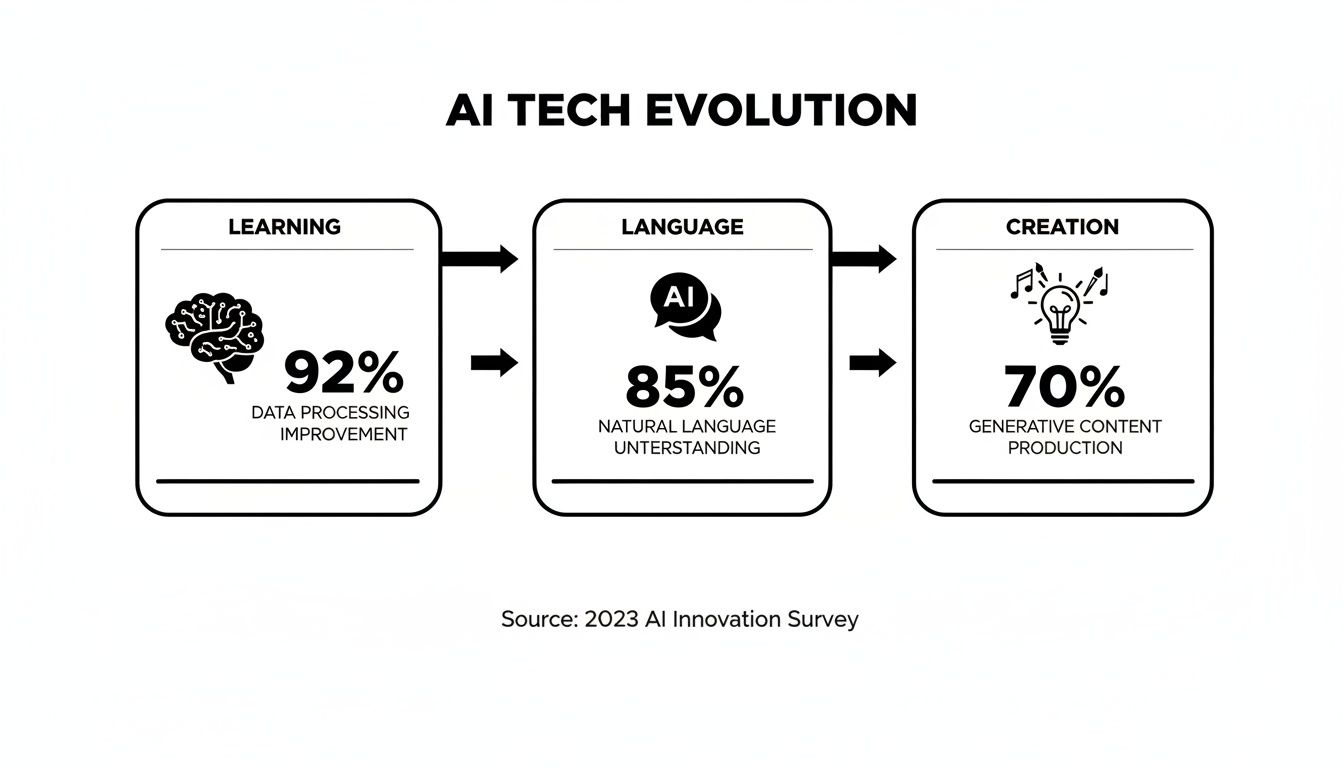
As you can see, AI’s ability to learn from data, understand what people are asking, and generate helpful responses is what fuels this massive leap in automation and better customer conversations.
Enhance Accuracy and Consistency
Let’s be honest, people make mistakes. An agent might be having an off day, forget a key policy detail, or explain the same thing two different ways to two different customers. For routine questions, AI completely removes that inconsistency.
By pulling answers directly from your official knowledge base, an AI gives the same, pre-approved, and accurate information every single time. This is a huge deal for everything from explaining your refund policy to walking a customer through a technical fix.
Think of AI as a single source of truth. It equips both your customers and your agents with reliable, consistent information, which builds trust and cuts down on the frustration of getting mixed messages.
It gets better. AI-powered tools can also act as a co-pilot for your human team. When a tricky ticket or question comes in chat or email, the AI can pop up with relevant help articles, suggest replies that have worked before, and give a quick summary of the customer’s history. This helps your agents solve problems faster and with more confidence, keeping the quality of support high across the entire team.
Achieve Significant Cost Savings
This is the one that really gets people’s attention. The impact of AI in customer service on your bottom line is direct and powerful. By automating so much of the manual work, you drastically reduce the cost of handling a high volume of support requests. You can finally scale up your support without having to scale up your headcount at the same rate.
The numbers don’t lie. Businesses are seeing jaw-dropping cost reductions, in some cases slashing service expenses by up to 68% during their busiest seasons. An average chatbot conversation costs just $0.50, while a human-led one is closer to $6.00. That’s a 12x difference. Industry forecasts are even predicting $80 billion in savings on contact center labor by 2026.
So where do these savings come from?
- Ticket Deflection: AI handles the simple, repetitive questions through self-service, so they never even become a ticket for a human agent.
- Reduced Handling Time: For tickets that do need a human touch, AI provides summaries and suggested replies to speed things along.
- Optimized Staffing: With AI handling the bulk of easy queries, you can build a leaner team of expert agents who focus only on the complex, high-value issues.
Platforms like Ticketdesk AI are built from the ground up to maximize these savings by automating how tickets are handled and routed right from the start. Curious what that return on investment could look like for you? Play around with our handy help desk ROI calculator to get a clearer picture. When you combine better efficiency, spot-on accuracy, and serious cost reduction, the business case for AI becomes impossible to ignore.
How AI Shows Up in Everyday Customer Interactions
We’ve covered the tech and the business case, so let’s get down to brass tacks. How does AI in customer service actually look and feel on a normal Tuesday afternoon for a support team? It’s not one magical tool that does everything. Instead, think of it as a collection of smart applications, each one stepping in to make life easier for both your customers and your agents.
These applications are specialists. They act like dispatchers, coaches, and even librarians, each designed to fix a specific bottleneck in the support process. They turn clunky, manual chores into fast, automated workflows. Let’s dig into three of the most common ways AI is changing the game.

Intelligent Ticket Routing: The Master Dispatcher
Picture your support inbox as a chaotic train station during rush hour. Without AI, a human agent has to manually inspect every single person (or ticket) that comes through, figure out where they need to go, and point them to the right platform. It’s slow, mistakes happen, and it eats up a ton of your team’s valuable time.
Intelligent ticket routing completely automates that job. Using Natural Language Processing (NLP), the AI reads and understands the content of every new ticket the moment it arrives. It gets the customer’s intent, spots keywords, and even figures out how urgent the issue is.
With that analysis done, the AI becomes a master dispatcher, instantly assigning the ticket to the right agent or department.
- Got a billing question? It’s sent straight to the finance team. No pit stops.
- A technical bug report? It goes right to the engineers who can fix it.
- Someone asking for a new feature? The product team gets it immediately.
This simple change means tickets no longer languish in a general queue waiting for someone to sort them. The right person sees the problem right away, which slashes first-response times and kills the frustrating game of internal “hot potato” agents often have to play. Platforms like Ticketdesk AI are built for this, creating automated workflows that make sure every ticket finds its perfect home in seconds.
AI-Powered Agent Assist: The Real-Time Coach
Even your most senior agent doesn’t have every single answer memorized. That’s where AI-powered agent assist comes in. It’s like a real-time coach whispering helpful advice in your agent’s ear right when they need it.
As an agent types a reply to a customer, the AI works quietly in the background. It analyzes the conversation as it happens and offers up useful information without being disruptive. For example, it might pull up the perfect knowledge base article, suggest a pre-written macro for a common question, or give a quick summary of a long, complicated ticket history.
This isn’t about replacing an agent’s brain. It’s about giving them superpowers. They get instant access to the information they need to be fast, accurate, and consistent every single time.
This is a massive help for new hires just learning the ropes. With an AI co-pilot, they can jump in and handle tricky customer questions with the confidence of a seasoned pro, which shortens their training time and helps them become productive much faster.
Dynamic Self-Service Portals: The 24/7 Librarian
Let’s be honest, modern customers want to solve problems themselves. Many would rather find an answer on their own than wait to talk to a person for a simple question. Dynamic self-service portals, powered by AI, make that a reality.
We’re not talking about your grandmother’s static FAQ page. An AI-driven knowledge base or chatbot is more like an interactive librarian. A customer can type a question in plain English, and the AI will instantly search all of your help docs, tutorials, and guides to serve up the exact answer they need.
The payoff is twofold. First, you empower customers to solve their own problems whenever they want, which they love. Second, it deflects a huge chunk of simple, repetitive tickets that would otherwise clog up your queue. This frees up your agents to focus their brainpower on the complex, high-stakes issues where a human touch really matters.
Your Step-By-Step AI Implementation Roadmap
Jumping into AI for customer service feels like a huge project, but a good roadmap breaks it down into manageable chunks. Think of it less like a giant leap and more like a series of well-planned steps. This way, you build something that actually fits your business and starts paying for itself from day one.

This whole process doesn’t start with technology-it starts with strategy. Any successful AI rollout is built on a solid understanding of your current headaches and where you want to go.
Step 1: Define Your Core Objectives
Before you even look at a single vendor, you need to know what problem you’re trying to solve. What are the specific pain points you want to eliminate? A vague goal like “improve efficiency” just won’t cut it. You have to get specific.
Your goals need to be measurable and tied directly to real business outcomes. For instance:
- Reduce First Response Time: Aim to slash the average time a customer waits for that first reply by 40% within three months.
- Increase Ticket Deflection: Set a target to cut down on routine, repetitive tickets by 25% by launching a self-service bot.
- Boost CSAT Scores: Make it a goal to improve your Customer Satisfaction (CSAT) score by 10 points on conversations handled by AI.
Having these clear targets will guide every single decision you make, from the platform you choose to how you measure success later on. It’s how you define what a “win” actually looks like for your team.
Step 2: Start Small With a Focused Pilot Project
Don’t try to boil the ocean. A massive, company-wide AI rollout right out of the gate is risky and needlessly complex. Instead, kick things off with a small, focused pilot project to prove the concept and score some early wins. This keeps the risk low and helps you learn what actually works for you.
A pilot project is your sandbox. It’s a low-risk environment to test your assumptions, gather real-world data, and build confidence within your organization before making a larger investment.
A great place to start is with an internal tool. Maybe an AI bot that helps your own support agents find answers in your knowledge base faster. This lets you iron out all the kinks without a single customer being affected. Another solid option is to automate just one, high-volume ticket category, like password resets.
Step 3: Choose the Right Technology Partner
Once your goals are crystal clear, it’s time to find the right tool for the job. Not all AI platforms are built the same. You need a partner that fits your goals, budget, and technical skills. My advice? Look for solutions that come pre-trained on customer service data-it makes the setup process dramatically faster.
Here’s a quick checklist for picking a partner:
- Ease of Implementation: Can you get it running in minutes, or does it need a whole team of developers? Platforms like Ticketdesk AI are designed to be deployed fast.
- Integration Capabilities: Does it play nice with your existing helpdesk, CRM, and other tools you can’t live without? If you have developers who need to build custom connections, checking the platform’s documentation, like the Ticketdesk AI API reference, is a must-do.
- Scalability: Will this platform grow with you, or will you outgrow it in a year?
- Security and Compliance: Does the vendor take data privacy seriously? Your customer data has to be kept safe.
Step 4: Train Your AI and Your Team
Finally, a good launch needs two kinds of training. First, you have to train the AI model itself with high-quality data. This means feeding it your existing help articles, old resolved tickets, and FAQs. The better the data you give it, the smarter your AI will be.
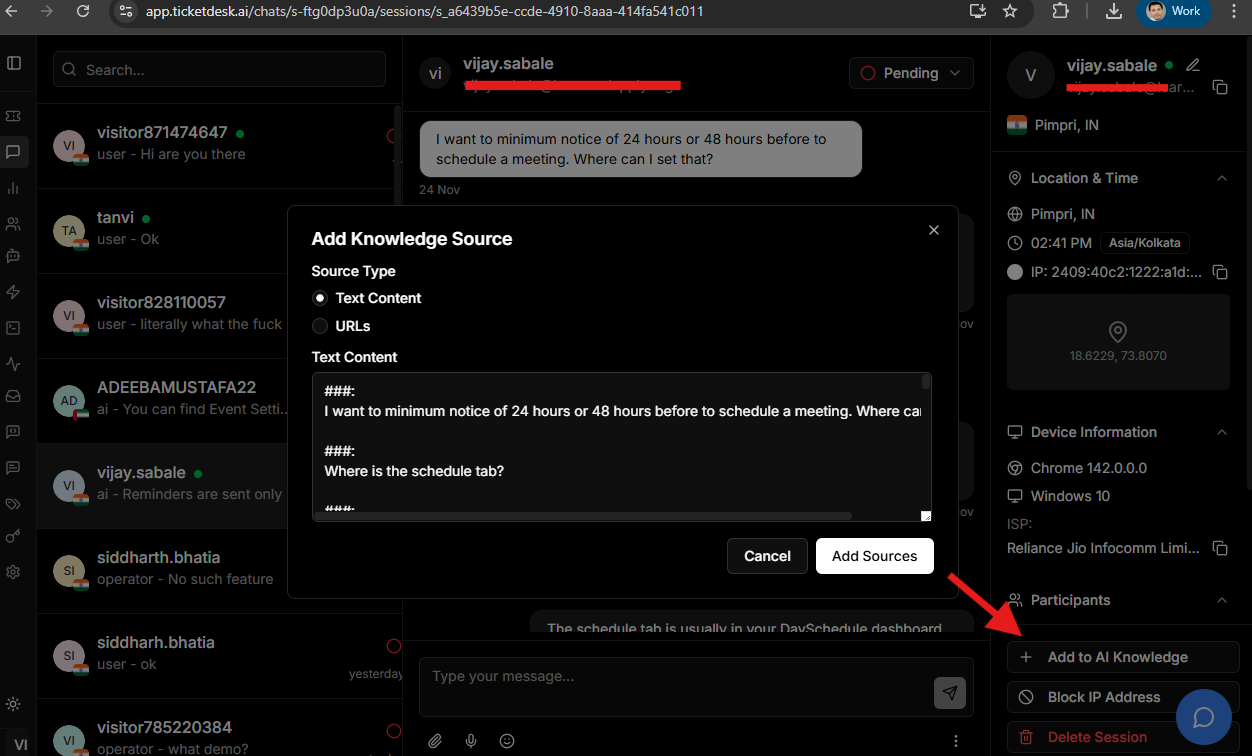
Just as important, though, is training your human team. They need to see the AI as a partner, not a replacement. Show them how these new tools will take the boring, repetitive tasks off their plate so they can focus on more strategic, high-value work. Getting this change management piece right is absolutely essential for a smooth rollout and long-term success.
Measuring Success and Avoiding Common Pitfalls
Launching an AI solution isn’t the finish line-it’s the starting gun. To make sure your investment is actually paying off, you have to get serious about measuring its impact and steering clear of the common mistakes that can sink the whole project. This means getting out of the “it feels like it’s working” mindset and into the data.
Success with AI in customer service isn’t just about automating things. It’s about making your support better, faster, and more efficient. The right numbers will tell you if you’re hitting that mark.
Key Performance Indicators for AI Success
Tracking the right Key Performance Indicators (KPIs) tells the true story of how your AI is performing. These aren’t just vanity metrics; they show how well the AI is actually resolving issues and making customers happier.
Here are a few essential KPIs to keep a close eye on:
- First Contact Resolution (FCR): This one is huge. It tracks the percentage of customer issues your AI resolves on the very first try, without ever needing a human agent to step in. A high FCR is a powerful sign that your AI is effectively knocking out common questions.
- Ticket Deflection Rate: This measures how many would-be support tickets get solved through self-service channels, like an AI-powered knowledge base or chatbot. Think of it as a direct indicator of how much work the AI is taking off your team’s plate.
- Customer Satisfaction (CSAT): The classic for a reason. After a customer interacts with your AI, ask them to rate their satisfaction. Low scores are a red flag, pointing you directly to areas where the AI’s answers or understanding needs a tune-up. You can even use a customer satisfaction calculator to benchmark your scores and see how you compare.
Watching these numbers gives you a clear, data-backed picture of your AI’s performance. It helps you tweak its behavior and, just as importantly, prove its value to the rest of the company.
Navigating Common Implementation Mistakes
Even the most powerful AI can fall flat if it’s rolled out poorly. If you know what the common tripwires are, you can sidestep them and ensure a much smoother launch.
The goal isn’t just to deploy AI, but to integrate it thoughtfully. Avoiding common errors ensures the technology supports your team and delights your customers, rather than creating new frustrations.
Three major pitfalls often derail AI projects. The first is using low-quality training data. Your AI is only as smart as the information you feed it. If you give it messy, outdated, or just plain wrong help docs, you’re going to get unhelpful, frustrating answers. A clean, well-organized knowledge base is completely non-negotiable.
Second, a lot of companies fail to manage customer expectations. Be upfront about when customers are talking to an AI. If you try to pass a bot off as a human, you’re going to break trust the second it makes a mistake (and it will). Clearly label your AI tools and always, always provide an easy escape hatch to a human agent.
Finally, a critical mistake is losing the human touch. AI should handle the repetitive, boring stuff to free up your agents for complex, high-empathy problems. Never get rid of the option for human interaction entirely. The best strategies blend AI’s speed with human expertise, giving customers the best of both worlds.
Common Questions About AI in Customer Service
As you start looking into AI, a lot of the same questions and concerns tend to pop up. It’s completely normal. Let’s walk through some of the most common ones to clear things up and help you figure out if bringing AI into your support workflow makes sense.
Will AI Completely Replace Human Customer Service Agents?
Nope, not at all. Think of AI as a powerful partner for your team, not a replacement. It’s fantastic at handling the repetitive, high-volume questions that eat up your agents’ time. This frees them up to focus on the tricky, high-value conversations that really need a human touch-the ones that require empathy and sharp problem-solving skills.
The future here is a hybrid model. AI takes care of the simple stuff instantly, and your human experts step in to build relationships and tackle the more nuanced problems. This actually elevates your agents’ roles, turning them from just problem-solvers into true customer advocates.
A good way to think about it is this: AI handles the “what” and “how” questions, so your expert agents can focus on the more complex “why” scenarios.
How Much Does It Cost to Implement AI in Customer Service?
This is a classic “it depends” question. The cost can vary quite a bit based on what you need. A simple, off-the-shelf chatbot for a small business might only be a few hundred dollars a month. On the other end, a full-blown enterprise platform that deeply integrates with your CRM and uses custom-built machine learning models will be a much bigger investment.
The key is to start small with clear goals and a set budget. A lot of businesses run a small pilot program first to prove the ROI before they commit to a company-wide rollout. And when you’re looking at the cost, don’t forget to factor in the money you’ll save from lower operational costs and the boost in your team’s productivity.
What Is the Biggest Challenge When Adopting AI for Support?
Hands down, the single biggest challenge is data quality. An AI is only as smart as the data you train it on. If you feed it messy, incomplete, or just plain wrong support conversations, you’re going to get poor results that just end up frustrating customers.
A successful rollout always starts with a serious effort to clean, organize, and label your data. The other big hurdle is just managing the change with your team. It’s so important to show them how AI will empower them, not replace them, and to give them solid training on how to work alongside their new AI tools.