Stop AI replies on spam, internal emails, or specific keywords using per-rule actions in the Ticketdesk AI block list.
The Block List is a special automation that tells your AI agent to ignore certain tickets. This is useful for filtering out spam, internal company emails, newsletters, or any sender you do not want the AI to reply to.
In this guide, I will walk you through how to add block rules and choose what happens when a rule matches.
Open the Block List
- Go to Setup > Agents and open your agent.
- Click the Automations tab.
- The Block List card is pinned at the top of the list, click Configure.
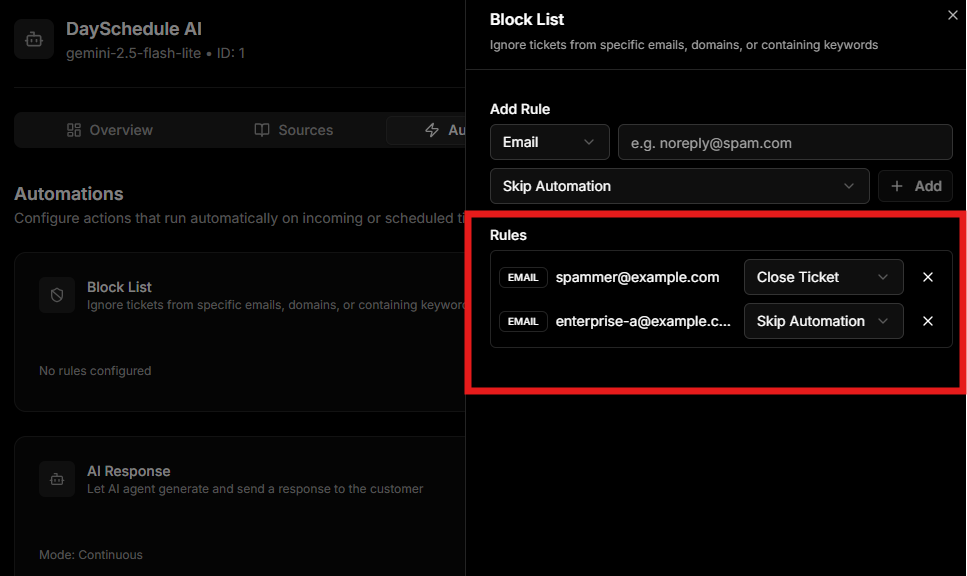
Rule Types
You can add three types of rules and mix them freely:
- Email, match a specific sender address, for example noreply@example.com
- Domain, match every sender from a domain, for example example.com
- Keyword, match a word or phrase found in the subject or body, for example refund
Per-Rule Action
Each rule has its own action so you can fine tune the behaviour. The two available actions are:
- Close ticket, the ticket is created but immediately closed, useful for spam
- Skip automation, the ticket stays open for a human to handle but the AI will not auto reply, useful for VIP customers
For example, you might configure:
- noreply@example.com, close ticket
- enterprise-client@example.com, skip automation
- refund in subject, skip automation
Add a Rule
- Click Add Rule inside the Block List sheet.
- Pick the type, Email, Domain, or Keyword.
- Enter the value to match.
- Pick the action for that specific rule.
- Repeat for each rule you need, then click Save.
Edit or Remove a Rule
To remove a rule, click the trash icon next to it. To change the action, just pick a different option from the action dropdown on that row. All changes only take effect after you click Save.
How It Works
When a new ticket arrives, Ticketdesk AI checks each block rule in order:
- If the sender email matches an Email rule, the rule action runs.
- If the sender domain matches a Domain rule, the rule action runs.
- If the subject or body contains a Keyword, the rule action runs.
If no rule matches, the ticket flows through your normal automations.
Next Steps
- Combine the block list with AI Response to reply only to real customers
- Setup Routing to assign the tickets that pass the block list