Tickets
Follow support activity in real time
Updated · View as Markdown
The Activities page shows what is happening across all tickets right now: AI replies, auto-replies, queued automations, your team's replies and notes, and new customer messages. It's the quickest way to check that the AI agent is answering the way you expect without opening tickets one by one.
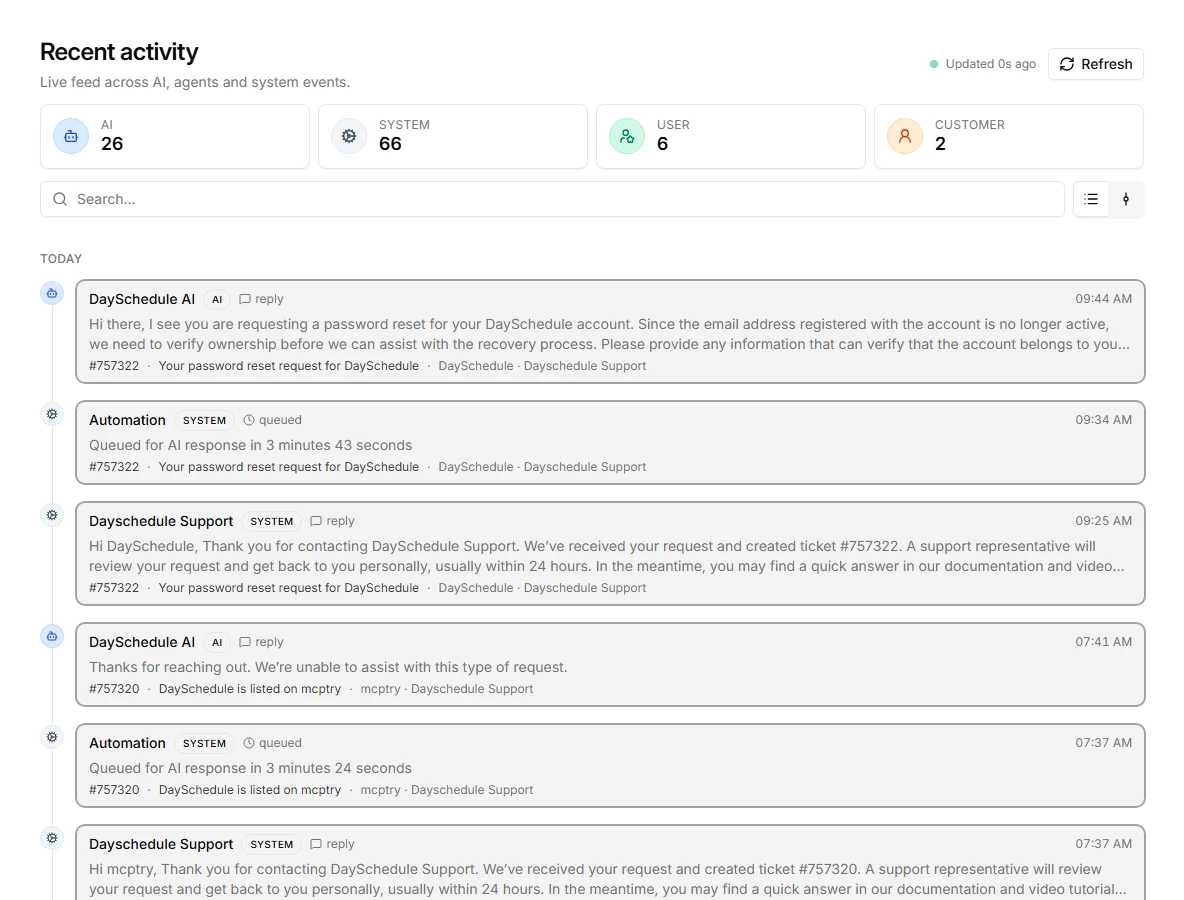
The feed loads the 100 most recent activities and checks for new ones every 10 seconds. New items slide in at the top and are highlighted for a few seconds. Click Refresh to update right away.
Who did what
The four cards at the top count activities by who caused them:
- AI: replies and actions from your AI agents
- System: automations such as auto-replies and "Queued for AI response" entries
- User: replies, notes and changes made by your team
- Customer: messages from requesters
Click a card to show only that type. Click it again to go back to everything.
Each entry shows the actor, the type of activity (such as reply or queued), the time, the message text, and the ticket number, subject, requester and inbox it belongs to. Click an entry to open the ticket.
Search the feed
The search box filters the loaded activities by message text, ticket subject or number, requester, inbox and actor name. For example, search for an inbox name to watch one team, or for "queued" to see which tickets are waiting for an AI reply.
The search only covers the activities currently in the feed. To find older tickets, use search and filters on the Tickets page.
Timeline and list view
Use the two buttons next to the search box to switch between the timeline, which groups activities by day with a line connecting them, and a more compact list.
When to use something else
- The full history of one ticket is in the ticket's own timeline. See comments and activity.
- To check whether an AI reply failed or how long it took, open AI jobs and logs.
- Trends over weeks, such as AI vs. human replies per day, are in Reports.