Team and account
Review audit logs
Updated · View as Markdown
Audit logs record every change made in your account, whether it came from a teammate in the app, a script using an API key or an AI tool connected through the MCP server. Use them to find out who deleted a ticket, why an integration keeps failing, or when a setting changed.
Open Settings and select Audit Logs.
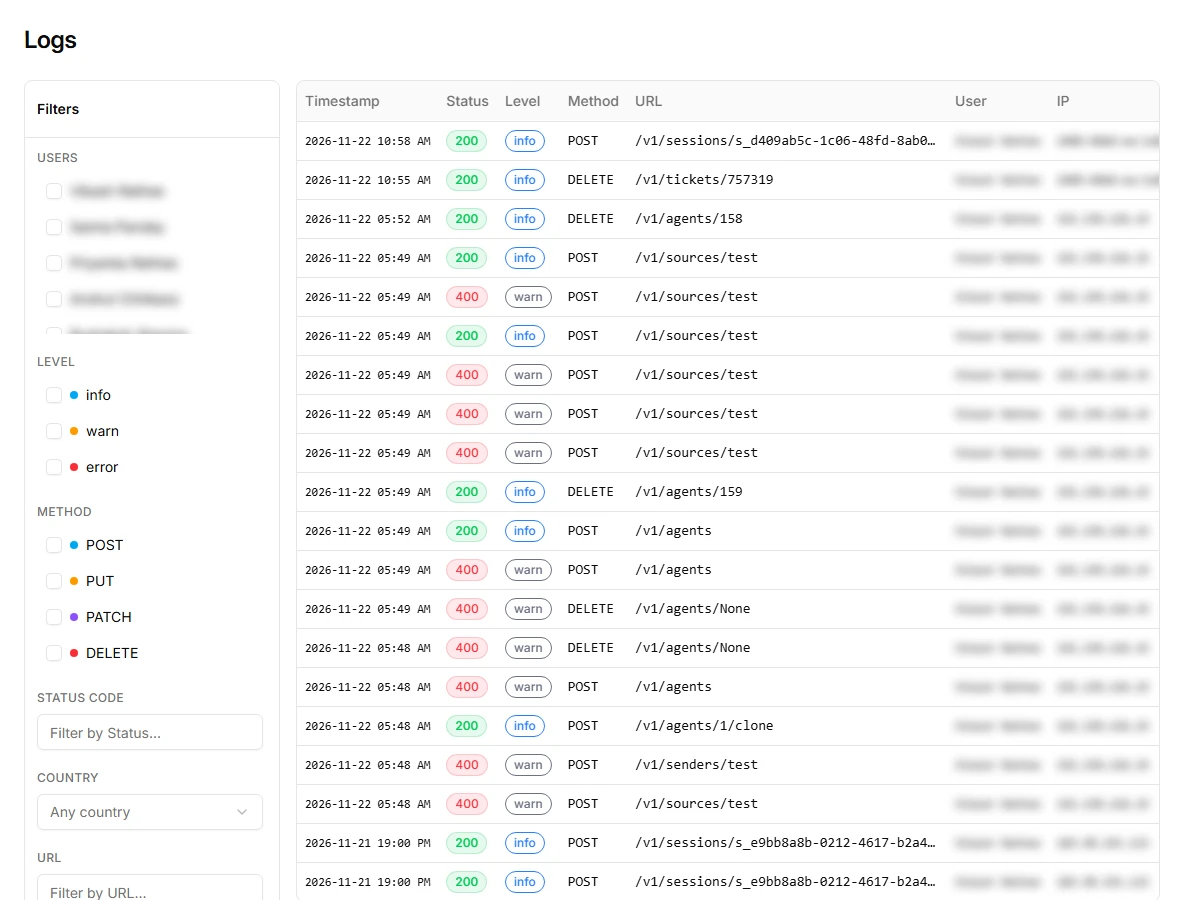
What gets logged
Every request that creates, updates or deletes something: POST, PUT, PATCH and DELETE. Viewing data with GET requests isn't logged, so the log stays focused on changes.
Each row shows:
- Timestamp of the request
- Status, the HTTP status code returned
- Level:
infofor successful requests (2xx),warnfor rejected ones (4xx, such as validation errors or missing permissions) anderrorfor server errors - Method and URL, for example
DELETE /v1/tickets/757319 - User who made the request, IP address and Country
- Duration of the request
The URL tells you what was changed. /v1/tickets/... is a ticket, /v1/agents/... an AI agent, /v1/sessions/... a chat session, and so on. The API reference lists every endpoint.
Filter the log
The filter panel on the left narrows the list. Combine as many as you need:
- Users: one or more teammates
- Level:
info,warnorerror - Method:
POST,PUT,PATCHorDELETE - Status code, for example
403 - Country
- URL, for example
/v1/tickets/757319to see every change to one ticket - IP
Some common questions and the filters that answer them:
- Who deleted a ticket? Method
DELETEand the ticket number in URL. - Why does our integration fail? Level
warnorerror, and the IP of your server. - What did a teammate change today? Their name under Users.
See the full request
Click a row to open its details: request info, client info, the request body that was sent, the response, and any error. For a failed API call, the error and response usually say exactly which field was wrong.
Request bodies can contain customer data from tickets and chats, so treat audit log access like access to the tickets themselves.
Related
- Team members and roles controls who can delete
- AI jobs and logs shows what your AI agents did, which isn't part of the audit log